
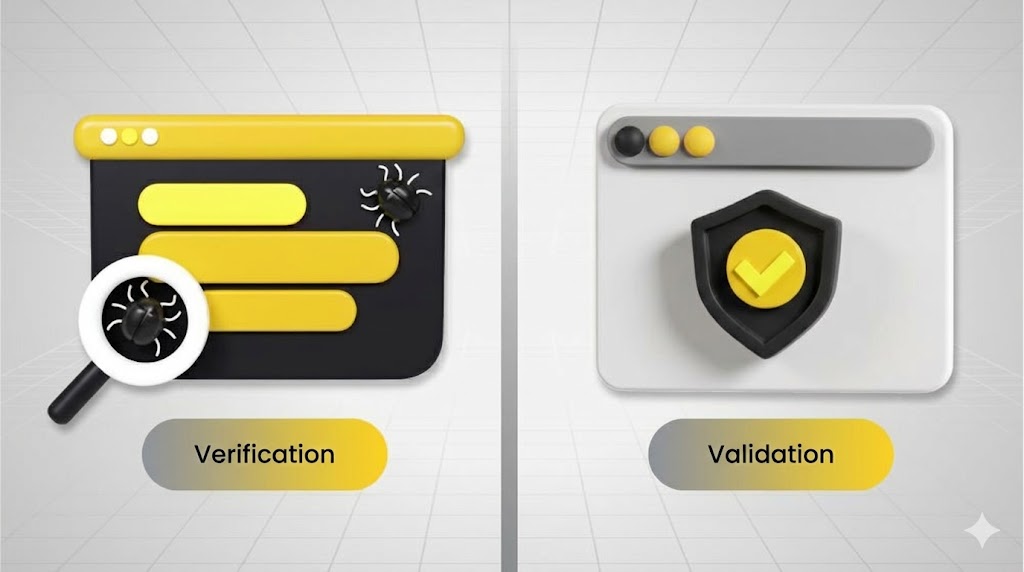
Verification and validation testing explained with the V-Model: when to verify vs validate, key techniques, and how to build traceable test plans that reduce defects.
Introduction: Why Two Different Types of Testing Matter
Have you ever wondered why some software applications run flawlessly while others crash unexpectedly? The secret lies in a discipline that separates world-class software from mediocre solutions: verification and validation testing. But here’s the catch—these two terms sound identical, yet they represent fundamentally different approaches to ensuring software quality.
Think of verification and validation testing as a two-stage quality checkpoint. One checks if you’re following the blueprint correctly. The other ensures the blueprint itself was worth building. This distinction changes everything in how teams approach software development and quality assurance.
In this comprehensive guide, we’ll unpack the nuances of verification and validation in software testing, explore the key differences, and reveal why understanding both is essential for delivering software that doesn’t just work—software that delights users.
Understanding Verification and Validation Testing
What Exactly is Verification Testing?
Verification and validation testing starts with verification, which answers a critical question: “Are we building the product right?”
Verification is a systematic examination of work products—requirements documents, design blueprints, code implementations, test plans—to confirm they conform to established specifications and standards. It’s a quality gate that runs throughout the development lifecycle, not just at the end.
The IEEE Standard defines verification as: “A test of a system to prove that it meets all its specified requirements at a particular stage of its development.”
In practical terms, verification in manual testing and automated environments involves:
- Reviewing requirements for clarity and completeness
- Auditing design documents to catch architectural flaws
- Performing code inspections to identify defects before execution
- Running static analysis tools to detect syntax and logic errors
- Conducting formal walkthroughs with cross-functional teams
What is Validation Testing?
Validation asks the inverse question: “Are we building the right product?”
Validation is the dynamic process of evaluating a complete or near-complete system against actual user needs, business requirements, and real-world operating conditions. It focuses on whether the software solves the actual problem it was meant to solve.
The IEEE Standard defines validation as: “An activity that ensures that an end product stakeholder’s true needs and expectations are met.”
While verification and validation in software testing are distinct, they’re deeply interconnected. Verification ensures technical correctness. Validation ensures customer satisfaction.
The Core Difference Between Verification and Validation in Software Testing

Verification: The “Built It Right” Checkpoint
| Aspect | Verification |
| Question | Are we building the product right? |
| Focus | Conformance to specifications |
| Activities | Reviews, inspections, static analysis |
| Execution | Primarily non-execution based |
| Timing | Throughout development (early and often) |
| Responsibility | Developers, architects, code reviewers |
| Scope | Design documents, code, requirements |
| Error Detection | Preventive (catch issues early) |
| Tools | Linters, code analyzers, documentation checkers |
Verification and validation in software testing starts the moment design documents emerge. A developer writes code, and peers review it against specifications. A tester examines requirements for testability. An architect validates that the design aligns with the system blueprint.
Validation: The “Built the Right Thing” Checkpoint
| Aspect | Validation |
| Question | Are we building the right product? |
| Focus | Meeting user/business needs |
| Activities | Functional testing, UAT, beta testing |
| Execution | Requires running the software |
| Timing | After development, iteratively |
| Responsibility | Testers, users, product managers |
| Scope | Finished features, system behavior, UX |
| Error Detection | Detective (catches real-world issues) |
| Tools | Test automation frameworks, performance tools |
What is verification and validation in manual testing environments becomes clearer when you see validation in action: QA testers execute test cases against working software. End-users interact with the application in beta environments. Product managers verify that delivered features match business requirements.
Verification Techniques: Building a Foundation of Quality
Verification and validation testing leverages dozens of techniques. Here are the most impactful for verification:
Static Analysis Approaches
Code Inspections and Walkthroughs
A structured walkthrough assembles 4-6 team members: a presenter (developer), a coordinator, a scribe, and subject matter experts. The presenter walks through code logic while others ask probing questions. This technique surfaces logical errors, violates design patterns, and catches assumptions before they become bugs.
Research shows formal inspections detect 60-90% of defects before any code execution happens.
Requirement Reviews
Before code exists, requirements documents themselves become the first testing artifact. Questions to validate requirements:
- Are all requirements testable?
- Do requirements contain conflicts or ambiguities?
- Are non-functional requirements (performance, security, scalability) clearly specified?
- Does each requirement have traceability to design and test cases?
Design Documentation Reviews
Design documents translate requirements into architecture. Reviewers verify:
- Control flow correctness (do decision paths make logical sense?)
- Data dependency integrity (are variables properly initialized before use?)
- Module interface specifications (are input/output contracts clear?)
- Adherence to architectural patterns and standards
Dynamic Static Techniques
Data Flow Analysis
This technique traces how data moves through the system. It constructs graphs showing:
- Where variables are defined (DEF sets)
- Where variables are used (USE sets)
- Paths from definition to usage (DEF-USE pairs)
For example, if variable temperature is set at line 5 but never read, this wasteful definition signals dead code. If temperature is used at line 12 without ever being initialized, this reveals a critical error.
Control Flow Analysis
Software doesn’t just execute sequentially—it branches, loops, and makes decisions. Control flow analysis examines:
- Every conditional branch (if-then-else)
- Loop structures and their exit conditions
- State transitions in complex systems
A state transition diagram for an e-commerce checkout might show: Initializing → Open for Items → Closed for New Items → Processing Payment → Cancelled. Analysts verify each state can be reached, exited, and responds correctly to all possible conditions.
Symbolic Evaluation
Rather than running code with concrete values, symbolic evaluation executes code with symbolic inputs. If code says: Z = -10 * currentClock, and currentClock is always zero or positive, symbolic execution immediately detects that Z will always be negative—revealing a logic error without waiting for test execution.
Formal Verification Techniques
Cause-Effect Graphing
This technique asks: “What causes what?” Developers identify input causes and system effects, then construct a graph showing causal relationships. Once the cause-effect graph is built, a decision table maps which combinations of causes produce which effects. This systematically generates test cases ensuring all cause-effect relationships are correctly modeled.
Validation Techniques: Confirming Real-World Success
Functional Testing Approaches
Black-Box Testing (Functional Testing)
The application becomes a “black box”—testers care only about inputs and outputs, not internal logic. Test cases typically focus on:
- Happy Path Testing: Does the system work when everything goes right?
- Boundary Value Testing: Does the system handle edge cases? (e.g., maximum file size, minimum age requirements)
- Invalid Input Testing: How does the system respond to bad data?
- Equivalence Partitioning: Can testers reduce test cases by grouping inputs into equivalence classes?
Structural Testing Approaches
White-Box Testing (Structural Testing)
Testers now see the internal code. White-box techniques ensure:
– Branch Testing: Every decision point (if-then-else) is executed in both directions. Code with 5 branches needs at minimum 5 test cases to exercise all branches.
– Path Testing: Some systems have thousands of possible execution paths. Testers prioritize critical paths (frequently used, high-risk) and ensure those execute correctly.
– Data Flow Testing: For each DEF-USE pair identified during verification, a test case forces that exact path to execute, ensuring data flows correctly.
– Loop Testing: Loops are error-prone:
- Skip the loop entirely
- Execute the loop once
- Execute the loop n times (where n is the maximum allowed)
- Execute the loop n-1, n, and n+1 times
- Attempt to exit on invalid conditions
User-Centric Validation
User Acceptance Testing (UAT)
Real stakeholders execute real scenarios:
- Can a bank teller complete a fund transfer?
- Can a patient schedule an appointment through the new portal?
- Does the reporting dashboard display accurate metrics within acceptable response times?
UAT isn’t about finding every bug—it’s about confidence that the software solves the business problem.
Beta Testing
Select real-world users test pre-release software. Unlike controlled lab testing, beta testers use the software in production environments, with their own data, their own workflows, their own connectivity conditions. Beta testing reveals integration issues and usability gaps impossible to predict in controlled environments.
Why Verification and Validation in Software Testing Matter
The Cost of Skipping Either Step
Verification Without Validation: Your software meets every specification… but users hate it. You built the technical requirements perfectly but nobody actually wanted the product. This happens more often than organizations admit.
Validation Without Verification: Your software does what users want… but it crashes during peak usage. You prioritized user feedback over technical rigor. Security vulnerabilities slip through. Performance degrades. Users lose trust.
The most reliable software combines both:
- Rigorous verification ensures the foundation is solid
- Thorough validation ensures it solves real problems
The Prevention vs. Detection Principle
Verification is preventive. A code inspection catching a logic error before implementation prevents that error from ever reaching production. Studies show each verification activity prevents 10-100 bugs downstream.
Validation is detective. Testing reveals whether the system actually works. But by then, the cost to fix is magnified. A defect found in verification might cost $1 to fix. That same defect found in production might cost $1,000 to fix (emergency patches, customer support, reputation damage).
The Complete V&V Lifecycle: When to Apply Each Technique
The ideal approach follows a pattern called the V-Model:
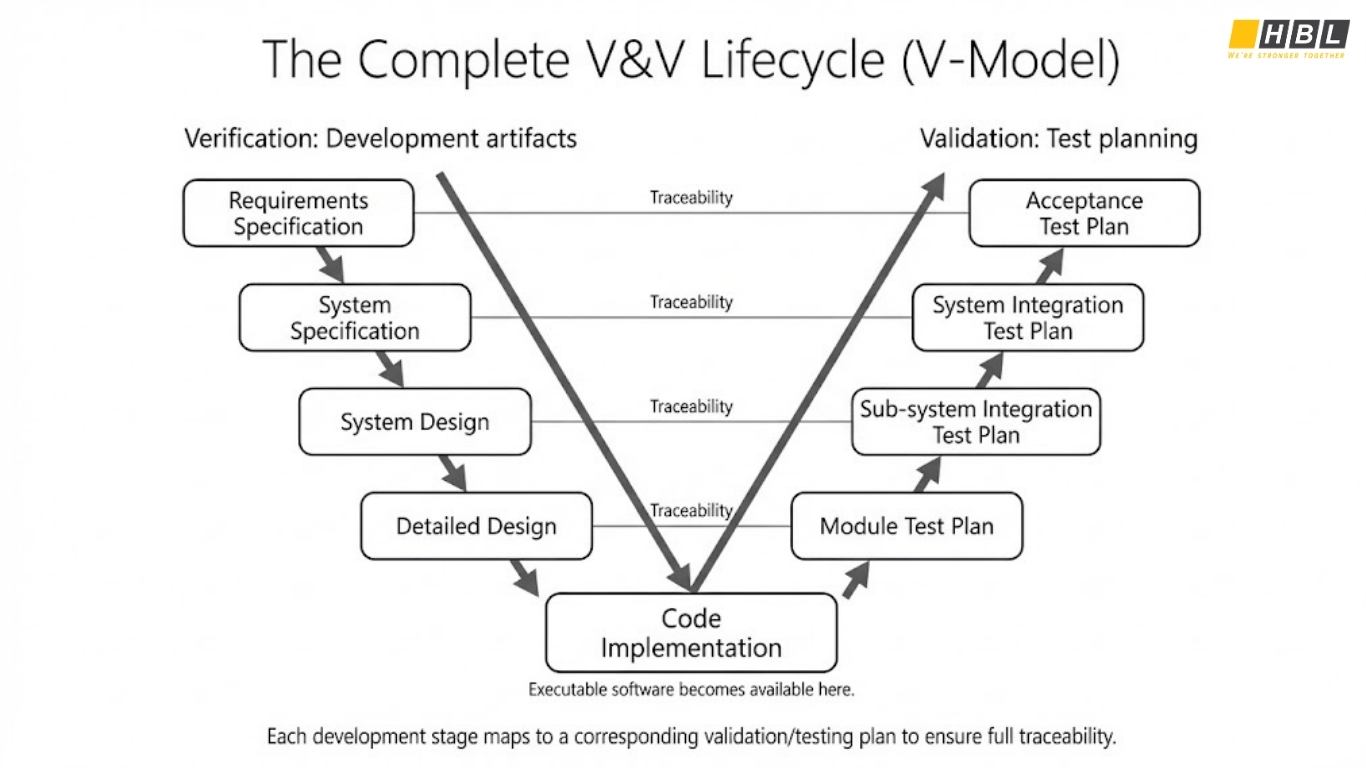
Requirements Phase
- Verification: Review requirements for completeness, clarity, testability
- Validation: Begin drafting acceptance test cases
Design Phase
- Verification: Inspect design documents against requirements
- Validation: Plan system integration tests
Implementation Phase
- Verification: Code reviews, static analysis, unit testing
- Validation: Execute integration tests as modules complete
Testing Phase
- Verification: Final specification reviews
- Validation: System testing, UAT, performance testing
Deployment Phase
- Verification: Production readiness checklists
- Validation: Post-deployment monitoring
Key Verification and Validation Testing Techniques Summary
Verification Toolkit
- Audits: Investigate overall development process compliance
- Desk Checking: Manual code review at developer’s desk
- Documentation Checking: Quality assessment of all project artifacts
- Face Validation: Expert judgment on reasonableness of specifications
- Inspections: Formal 5-phase review process (overview, preparation, inspection, rework, follow-up)
- Reviews: Higher-level process inspections involving management
- Walkthroughs: Structured presentations with peer questioning
- Static Analysis: Automated code analysis without execution
- Symbolic Evaluation: Execution with symbolic inputs instead of real values
- Traceability Assessment: One-to-one matching of requirements to design to implementation
Validation Toolkit
- Acceptance Testing: Client tests software against contract requirements
- Alpha Testing: In-house users test pre-release software
- Beta Testing: Real users test in controlled pre-release environment
- Functional Testing: Black-box testing of features
- Integration Testing: Modules connected and tested together
- Regression Testing: Previous test cases re-run after code changes
- Sanity Testing: Quick validation of specific changes
- Stress Testing: System tested under extreme load conditions
- System Testing: Complete system tested end-to-end
- Usability Testing: Real users complete tasks while observers note difficulties
Verification and Validation Testing in Manual Testing Environments
When automation isn’t feasible (or economical), manual verification and validation in manual testing becomes critical:
Manual Verification
- Reviewers physically examine documents, code, and designs
- Inspections happen in meetings where findings are discussed and documented
- Checklists guide reviewers toward common error patterns
- Corrections are tracked through formal rework processes
- Sign-off indicates formal agreement that issues are resolved
Manual Validation
- Testers execute test cases step-by-step, recording results
- Exploratory testing allows testers to deviate from scripts when anomalies appear
- Usability testing involves real users completing real workflows
- Feedback is gathered through observation, interviews, surveys
- Edge cases are discovered through manual probing rather than programmatic exhaustion
The advantage of manual approaches? Humans catch contextual errors and UX problems that automated approaches miss.
The disadvantage? They don’t scale for large applications or high-frequency testing.
Common Pitfalls in Verification and Validation Testing
Pitfall #1: Treating V&V as Afterthoughts
Many organizations code first, then add testing. By then, architectural flaws are baked in. Best practice: Verification activities begin with requirements. Validation test cases are drafted during design, not after implementation.
Pitfall #2: False Confidence from Testing
Testing reveals bugs, but you cannot test quality in. A product with 1,000 bugs found and fixed isn’t guaranteed to have zero remaining bugs. Verification techniques caught many issues before they became bugs. Don’t skip either step.
Pitfall #3: Inadequate Traceability
Without clear mapping from requirement → design → code → test case, gaps emerge. Features get implemented but never tested. Test cases validate undocumented features. Best practice: Maintain a traceability matrix throughout the project.
Pitfall #4: Assuming One Testing Approach Fits All
A simple form validation module needs less verification than a safety-critical control system. A B2C web app’s UAT differs from enterprise software’s UAT. Scale your V&V activities to match risk and requirements.
Real-World Case Study: Mobile Banking Application
Let’s apply verification and validation testing to a concrete example:
Scenario: Building a Money Transfer Feature
Verification Phase
- Requirements Review: “Transfer up to $10,000 between accounts” — is $10,000 tested boundary specified? Is confirmation flow required?
- Design Review: How is money deducted from source account? What if deduction succeeds but deposit fails?
- Code Inspection: Variables initialized properly? Division by zero prevented? SQL injection escaped?
- Static Analysis: Unused variables? Unreachable code? Improper null checking?
- Unit Testing: Each function returns expected results in isolation
Validation Phase
- Functional Testing: Can I transfer $50 between my own accounts? Does $10,001 transfer get rejected?
- Integration Testing: Does the database update correctly? Does the notification system fire?
- System Testing: Does the money transfer work alongside scheduled bill payments? With concurrent users?
- Security Testing: Can I intercept the transfer request and modify the amount?
- Performance Testing: Do 1,000 simultaneous transfers complete within SLA?
- UAT: Do bank tellers confirm the feature works as expected? Do customers find it intuitive?
Only after both verification and validation pass does the feature deploy to millions of users.
Building a Verification and Validation Testing Strategy
Phase 1: Planning (Project Kickoff)
- Define verification techniques by development phase
- Define validation approaches by test level
- Allocate resources and budget
- Establish acceptance criteria
Phase 2: Requirements (Week 1-4)
- Verification: Requirements inspection meetings
- Validation: Design acceptance test scenarios
- Output: Requirements approval + test plan draft
Phase 3: Design (Week 5-8)
- Verification: Design walkthroughs, traceability checks
- Validation: Test case authoring begins
- Output: Approved design + complete test plan
Phase 4: Implementation (Week 9-16)
- Verification: Code reviews, inspections, unit testing
- Validation: Test case refinement, test data preparation
- Output: Code approval + comprehensive test suite
Phase 5: Testing (Week 17-22)
- Verification: Final code audits
- Validation: Systematic test execution and defect reporting
- Output: Bug reports, test summaries
Phase 6: Deployment (Week 23+)
- Verification: Production readiness checklist
- Validation: Post-deployment smoke testing, monitoring
- Output: Production release, monitoring dashboard
CONSULT AND PLAN YOUR V&V ROADMAP
Tools and Technologies for V&V
Verification Tools
- SonarQube: Static code quality analysis
- FindBugs: Java bytecode analysis for bugs
- ESLint: JavaScript code quality
- Checkstyle: Code style compliance checking
- Architecture Decision Records: Structured design documentation
Validation Tools
- Selenium: Web application automation
- JUnit: Java unit testing framework
- Postman: API testing
- LoadRunner: Performance testing
- JIRA: Defect tracking and reporting
Supporting Tools
- Git: Version control and code review
- Confluence: Documentation and design artifacts
- TestRail: Test case management
- GitLab/GitHub: Continuous Integration/Continuous Deployment (CI/CD) pipelines
Measuring Success: Key Metrics for V&V
Verification Metrics
- Defect Detection Rate: Percentage of total defects found during verification
- Inspection Coverage: Percentage of code/documents inspected
- Defect Escape Rate: Percentage of defects found in production (lower is better)
- Time to Resolution: Average time from defect detection to fix completion
Validation Metrics
- Test Coverage: Percentage of code/requirements exercised by tests
- Pass Rate: Percentage of test cases passing on first execution
- Defect Density: Number of defects per 1,000 lines of code
- Mean Time Between Failures: Average duration before next failure in production
Combined Metrics
- Quality Index: Weighted combination of defect metrics
- Readiness Confidence: Probability software meets quality thresholds
- Return on Quality Investment: Cost of V&V activities vs. savings from defect prevention
The Future of Verification and Validation Testing

As software systems grow more complex—distributed, real-time, AI-powered—traditional V&V approaches face new challenges:
Continuous Verification
Rather than verification sprints, continuous verification integrates checks into every code commit:
- Automated static analysis on push
- Peer reviews triggered by policy violations
- Security scanning in CI/CD pipelines
Shift-Left Validation
Testing moves earlier, starting before coding completes:
- Test-Driven Development (TDD): Write tests first
- Specification by Example: Executable specifications double as test cases
- Model-Based Testing: Tests automatically generated from system models
AI-Assisted V&V
Machine learning augments human capabilities:
- Anomaly detection in code patterns
- Intelligent test case generation
- Defect prediction before code review
- Automated root cause analysis
Verification and Validation for AI Systems
As software incorporates AI/ML components:
- Validating training data quality
- Testing model robustness against adversarial inputs
- Verification of algorithm fairness and bias
- Monitoring model performance drift in production
About HBLAB – Your Trusted Software Quality & Development Partner

Verification and validation testing works best when engineering and QA operate as one system: clear requirements, strong reviews, measurable test coverage, and disciplined release readiness. HBLAB helps organizations build that system—whether the goal is improving product reliability, accelerating releases, or scaling QA capacity without losing control of quality.
With 10+ years of experience and a team of 630+ professionals, HBLAB supports end-to-end delivery: requirements clarification, architecture and code review practices, test strategy design, manual/automation execution, and continuous improvement. We hold CMMI Level 3 certification, helping teams standardize processes and maintain consistent outcomes across projects.
Since 2017, HBLAB has also invested in AI-powered solutions—useful for accelerating test design, improving defect triage, and strengthening quality signals across CI/CD pipelines.
Engagement stays flexible: offshore, onsite, or dedicated teams, aligned to your workflow and risk level. Many clients choose HBLAB for cost-efficient delivery (often ~30% lower cost) while still demanding strong engineering rigor.
👉 Looking for a partner to strengthen verification and validation testing and ship with confidence?
Contact HBLAB for a free consultation!
Conclusion: Your V&V Competitive Advantage
Software quality is determined before testing even begins. Teams that embrace comprehensive verification and validation testing don’t just avoid defects—they build confidence. Users trust software they can rely on. Organizations save costs by preventing expensive late-stage failures. Developers take pride in quality work.
The difference between verification and validation in software testing is profound: one is about building right, the other about building the right thing. Both are essential.
Start with your next project:
- Schedule verification activities alongside development, not after
- Plan validation scenarios during design, not after implementation
- Build traceability from requirement through test case
- Allocate resources to both activities—they’re equally important
Verification and validation testing isn’t overhead. It’s the foundation of software excellence.
Key Takeaways
- Verification answers “Are we building the product right?” through specifications conformance
- Validation answers “Are we building the right product?” through user needs confirmation
- Both verification and validation are necessary; neither alone is sufficient
- Verification and validation in software testing runs throughout development, not just at the end
- Apply verification techniques early to prevent defects
- Apply validation techniques systematically to detect issues in working software
- Use verification and validation in manual testing environments, complementing automation
- Measure success through defect metrics, coverage analysis, and quality indices
- Modern approaches integrate V&V into continuous development workflows
The most successful organizations don’t choose between verification and validation—they master both.
FAQ
1. What is verification and validation in software testing?
Verification checks whether the software (and its artifacts like requirements, design, and code) matches the specification—“Are we building the product right?”
Validation checks whether the running system meets real user needs—“Are we building the right product?”
2. What is the difference between verification and validation in software testing?
Verification focuses on conformance to written specs (often via reviews/inspections and static techniques), while validation focuses on real behavior in execution (testing the software with data and observing outcomes).
3. Can validation happen without verification?
It can, but risk increases: testing may reveal issues late, and fixes become slower and more expensive because upstream artifacts were never checked for correctness and clarity.
4. What is an example of verification vs validation?
Verification example: reviewing requirements and inspecting code to ensure it implements the specified rules.
Validation example: running acceptance tests with business users to confirm the workflow solves the real business problem.
5. What is verification and validation in manual testing?
Manual verification commonly includes document reviews, walkthroughs, and inspection checklists performed by people.
Manual validation includes executing test cases, exploratory testing, and user acceptance testing with real scenarios.
6. How does the V-Model connect verification and validation testing?
The V-Model pairs each development stage (requirements, design, detailed design) with a corresponding test plan level (acceptance, integration, module), strengthening traceability so nothing is missed.
7. Is verifying and validating the same thing?
No—verification is about meeting the specification, while validation is about meeting real customer/user expectations (which may go beyond the specification).
8. What are the three types of verification?
A practical way to group verification is: informal reviews (walkthroughs/inspections), static analysis of artifacts/code, and formal methods (mathematical/logic-based proof techniques).
9. How is V&V done in Agile?
Agile typically “shifts left” verification (early reviews, automated checks, acceptance criteria) and validates continuously through frequent test execution in each iteration, plus regression testing as changes accumulate.
10. What is the difference between verification and validation in ISO?
Verification and validation testing in ISO: Across many standards, while verification generally means confirming specified requirements were met, validation means confirming the product meets needs for its intended use; always check the exact ISO standard your organization follows because wording and scope can vary.
READ MORE:
– AWS Complete Beginner’s Guide: Cloud Infrastructure, IAM, and Best Practices
– What Is Martech? A Complete Guide to Marketing Technology, Martech Stack, Tools & Solutions
– Managing Information Services: A Strategic Guide to Modern IT Service Management (ITSM)