Chapter 1: Comprehensive AWS Cloud Infrastructure Overview
Understanding AWS Global Infrastructure: Regions, Availability Zones, and Edge Locations
Amazon Web Services has established a sophisticated global infrastructure that delivers high availability, optimal performance, and regulatory compliance across the world.
The architecture of AWS cloud infrastructure relies on three critical components: Regions, Availability Zones (AZ), and Edge Locations.
Understanding these foundational elements is essential for anyone planning to deploy applications and manage data on the AWS platform.
AWS Regions: The Foundation of Geographic Distribution
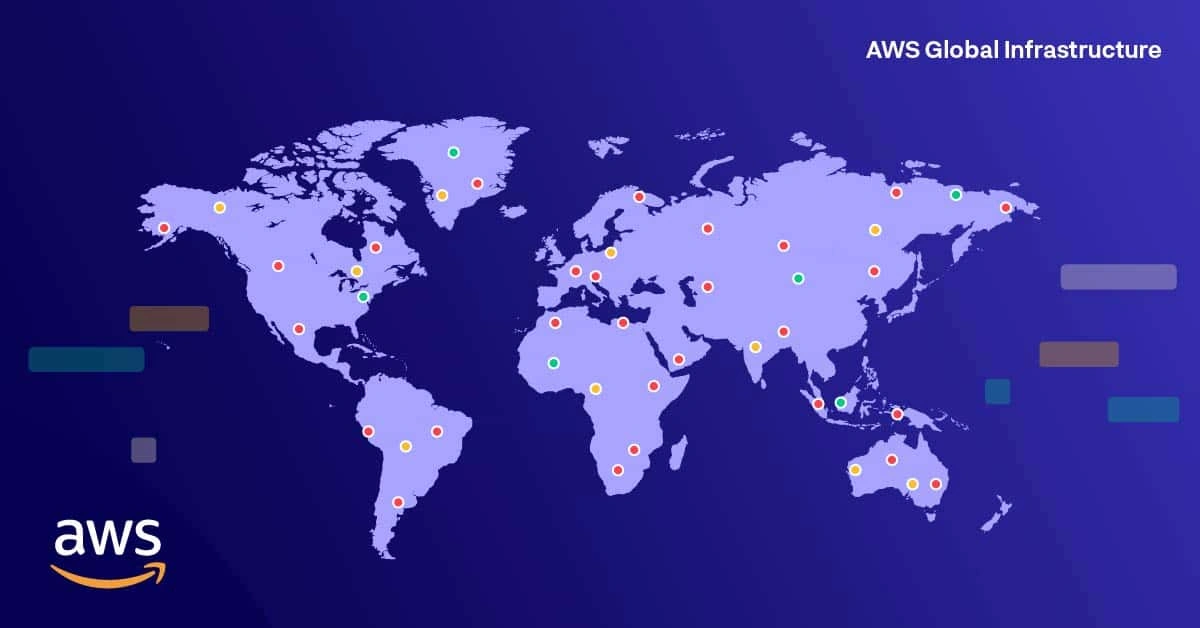
An AWS Region represents a distinct geographic area where Amazon has deployed complete infrastructure. Each AWS Region operates as a fully independent, physically isolated environment that contains multiple data centers and networking infrastructure.
This geographic separation is fundamental to AWS’s approach to fault isolation and compliance.
Key Characteristics of AWS Regions:
AWS Regions are completely isolated from one another, which means that any infrastructure failure, security breach, or service disruption occurring in one Region will have no impact on the operations, data integrity, or service availability in other Regions.
This isolation principle is central to building resilient cloud applications. Every Region has been assigned a unique identifier—such as us-east-1 for North Virginia, ap-southeast-1 for Singapore, or eu-west-1 for Ireland, making it easy to specify deployment locations programmatically.
Critical Factors When Selecting an AWS Region:
Choosing the right AWS Region is one of the most important decisions you’ll make when architecting your cloud infrastructure, as this choice affects latency, compliance, and cost.
The latency consideration is paramount because your users will experience faster response times when applications and data are hosted in Regions geographically closer to them. This latency reduction directly translates to improved user experience and higher application performance.
Additionally, numerous regulations and compliance frameworks impose strict data residency requirements. For example, the European Union’s General Data Protection Regulation (GDPR) imposes very strict rules that personal data of EU citizens be stored within EU territory, which means your workloads must be deployed in European AWS Regions.
Finally, it’s important to understand that AWS service pricing varies across Regions due to differences in operational costs, energy availability, and local market conditions.
Currently, AWS maintains a presence across more than 30 geographic Regions with over 100 Availability Zones distributed globally, providing unprecedented flexibility for building resilient, low-latency applications worldwide.
AWS Availability Zones: Enabling High Availability Within Regions
Within each AWS Region, you’ll find multiple Availability Zones (AZs), which are essentially collections of one or more independent data centers that have been purposefully designed for isolation and independent operation.
While Availability Zones reside within the same Region, they are physically separated from one another—typically by many miles—and maintain completely independent infrastructure systems.
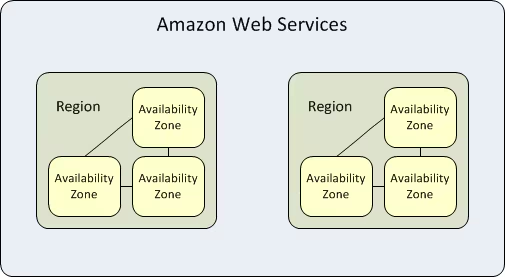
Defining Characteristics of Availability Zones:
The physical isolation of Availability Zones ensures that they are protected from correlated failures. Each Availability Zone maintains its own electrical power infrastructure, cooling systems, and networking equipment. This separation means that common failure scenarios such as power outages, natural disasters like flooding or earthquakes, or fires affecting one Availability Zone will not compromise operations in adjacent zones.
Within a single Region, all Availability Zones are interconnected through low-latency, high-bandwidth networking infrastructure that provides redundancy and fault tolerance.
This connectivity enables you to build applications that span multiple zones without concern about network performance degradation. Each Availability Zone receives an identifier that combines the Region code with a letter designation—for instance, us-east-1a, us-east-1b, and us-east-1c are three distinct zones within the us-east-1 Region.
Achieving High Availability and Disaster Recovery:
The primary reason for architecting your applications across multiple Availability Zones is to achieve high availability and enable disaster recovery capabilities. AWS best practices strongly recommend that all critical workloads—including production databases, application servers, and other essential services—should be deployed redundantly across at least two Availability Zones within the same Region.
This approach ensures that if one zone experiences an outage, your application continues to operate seamlessly from the other zone.
AWS Edge Locations: Optimizing Content Delivery and Reducing Latency
Edge Locations represent a different category of AWS infrastructure compared to Regions and Availability Zones. These are smaller data center facilities strategically distributed across the globe, numbering significantly more than the Regions and Availability Zones combined.
Rather than serving as platforms for launching compute instances or databases, Edge Locations fulfill a specialized role in optimizing content delivery and network performance for end users.
Primary Functions of Edge Locations:
The fundamental purpose of AWS Edge Locations is latency reduction through geographic proximity. By positioning Edge Locations in major cities and population centers worldwide, Amazon can bring content and network services physically closer to end users. This proximity translates directly into measurably lower latency when accessing cloud services. It’s important to understand that you cannot directly deploy applications or launch virtual machines on Edge Locations—instead, you deploy your primary infrastructure in Regions and Availability Zones, then use AWS services that leverage Edge Locations to optimize how end users access your systems.
AWS Services Operating at Edge Locations:
Several AWS services are specifically designed to leverage Edge Locations for performance optimization. Amazon CloudFront, AWS’s Content Delivery Network (CDN) service, caches both static and dynamic content at Edge Locations, allowing web pages, images, videos, and API responses to be served from locations nearest to requesting users. Route 53, Amazon’s managed Domain Name System (DNS) service, resolves DNS queries at Edge Locations closest to the requester, eliminating the need to query authoritative DNS servers at your origin. AWS Global Accelerator improves application performance by leveraging AWS’s private backbone network to intelligently route traffic to the optimal endpoints, bypassing unpredictable internet routing patterns.
Practical Example of Content Delivery Optimization:
Consider a scenario where you operate a web application with origin servers deployed in the Singapore Region (ap-southeast-1), but you have users accessing your service from Ho Chi Minh City. Without optimization, each user request would traverse the entire path from the user’s location to Singapore, incurring latency from multiple network hops. By implementing Amazon CloudFront, you distribute static assets (images, CSS files, JavaScript) to Edge Locations in major Vietnamese cities. Subsequent requests for these cached assets are fulfilled locally, dramatically reducing latency and improving page load times. Only non-cached, dynamic content or initial requests need to traverse back to your origin in Singapore.
Understanding Latency in Cloud Architecture
Latency represents the time interval, measured in milliseconds, required for a request to travel from a client to a server and for the response to return to the client. The principle underlying all latency optimization in AWS is straightforward: lower latency produces faster application responsiveness and superior user experience. AWS’s carefully designed global infrastructure—comprising Regions, Availability Zones, and Edge Locations—exists fundamentally to minimize latency and ensure users experience fast, responsive interactions with your applications regardless of their geographic location.
AWS Shared Responsibility Model: Understanding Security Boundaries
The AWS Shared Responsibility Model is a foundational security framework that clarifies the division of security obligations between Amazon Web Services and customers using AWS services. This model explicitly defines that AWS bears responsibility for “Security of the Cloud” while you, the customer, bear responsibility for “Security in the Cloud.”
Understanding this distinction is critical because it prevents confusion about who is accountable for specific security measures.
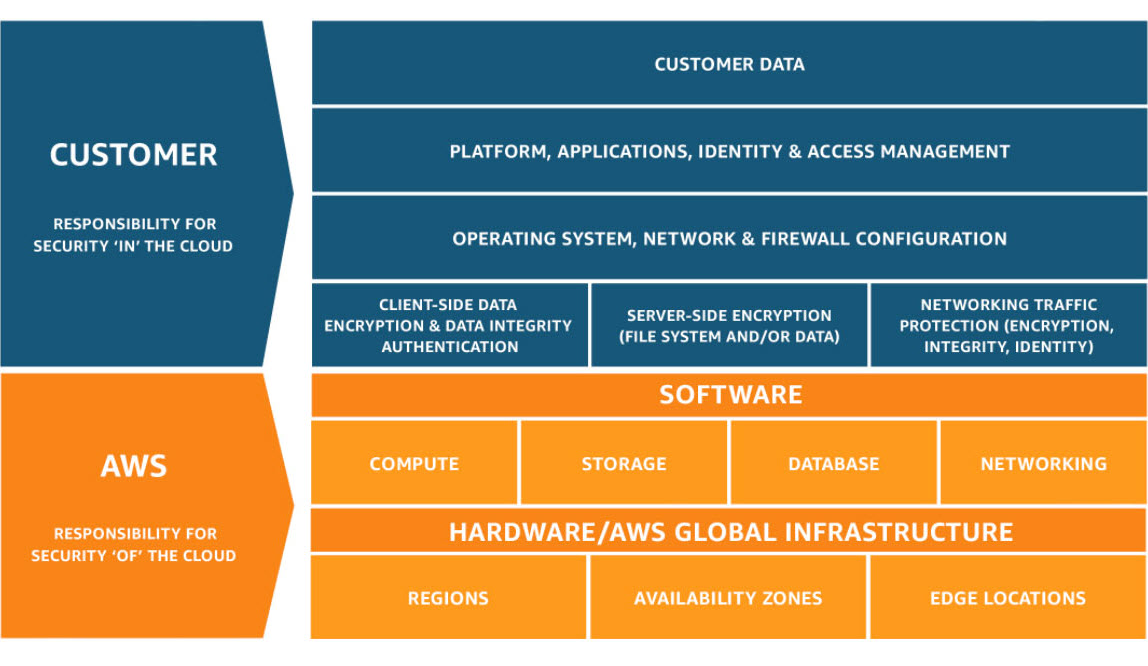
AWS Responsibilities: Security of the Cloud
Amazon Web Services maintains responsibility for the physical and infrastructure security of the cloud platform itself. This encompasses comprehensive protection of the physical facilities where AWS infrastructure operates worldwide. AWS designs and operates secure data centers with controlled access, including biometric authentication, security personnel, and video surveillance. The company manages the physical networking infrastructure, including routers, switches, and cables that interconnect facilities.
AWS is also responsible for maintaining the host operating systems that run the virtualization layer, periodically applying security patches and updates to protect against emerging threats.
All AWS customers benefit from AWS’s extensive compliance certifications and adherences. AWS maintains current certifications across multiple regulatory frameworks including ISO 27001 for information security management, SOC (Service Organization Control) reports for operational integrity, PCI DSS Level 1 certification for payment card data security, and HIPAA compliance for handling protected health information in the healthcare industry.
Your Responsibilities: Security in the Cloud
While AWS secures the infrastructure, you remain fully responsible for securing everything you build, deploy, and operate on top of that infrastructure. This responsibility encompasses several critical areas.
Data Protection and Encryption: You must implement encryption strategies appropriate to your security requirements. This includes encryption of data at rest (data stored on S3 buckets, databases, or EBS volumes) and encryption of data in transit (data traveling between services or to external systems). AWS provides encryption tools and services, but the decision to use encryption and the management of encryption keys remains your responsibility.
Identity and Access Management: You must create and manage IAM Users, Groups, and Roles with appropriate permissions following the principle of least privilege. This means carefully restricting access so that each user has only the permissions necessary for their specific role. You are responsible for implementing multi-factor authentication (MFA) for all privileged accounts and regular rotation of access credentials.
Operating System and Application Security: For Infrastructure-as-a-Service (IaaS) offerings like EC2 instances, you are responsible for patching and updating the guest operating system with security updates, installing and maintaining antivirus and anti-malware software, configuring host-level firewalls, and ensuring your application code is secure and free from vulnerabilities.
Network Security Configuration: You must properly configure Virtual Private Cloud (VPC) networks, Security Groups (which function as virtual firewalls), Network Access Control Lists (NACLs), and any required VPN connections. Misconfiguration of these network controls is a common source of security breaches.
Database and Data Management: You are responsible for applying security patches and updates to databases you manage, implementing appropriate backup and recovery procedures, maintaining database access controls, and classifying data according to sensitivity levels.
How Responsibility Differs Across Service Models
The precise boundary of responsibility shifts depending on which category of AWS service you’re using—Infrastructure-as-a-Service (IaaS), Platform-as-a-Service (PaaS), or Software-as-a-Service (SaaS).
Infrastructure-as-a-Service (IaaS)
– Examples: EC2, VPC, S3:
AWS manages the physical infrastructure, networking hardware, and host operating systems. You assume responsibility for the guest operating system (including all patches and updates), runtime environments, applications you deploy, data you store, and network configuration (Security Groups, route tables, ACLs). This service model provides maximum flexibility and control but also requires the greatest security management effort on your part.
Platform-as-a-Service (PaaS)
– Examples: RDS, Elastic Beanstalk, ECS:
AWS extends its responsibility to include operating system management and platform-level patching. You focus primarily on data security, application configuration, application-level security, and performance tuning. For RDS, for example, AWS handles database engine patching, but you control backup retention policies, encryption settings, and database access controls.
Software-as-a-Service (SaaS)
– Examples: S3 (as pure storage), DynamoDB, Lambda:
AWS manages nearly the entire infrastructure, platform, and application stack. Your responsibility concentrates on data security (what you store), access controls (who can access what), and secure configuration of the service. For an S3 bucket, AWS manages all infrastructure, but you must ensure the bucket is not accidentally made public and that you’ve enabled the encryption options you need.
Critical Security Reminders
A frequent source of security incidents is misconfiguration of S3 buckets. Because S3 provides simple, powerful storage, it’s tempting to assume AWS manages all security. However, you must explicitly configure bucket policies and access controls to prevent unauthorized access. Many data breaches have resulted from engineers accidentally making sensitive S3 buckets publicly accessible.
The Shared Responsibility Model should reinforce an important principle: AWS has secured the foundation, and now your organization must use that secure foundation correctly by implementing proper security practices for your own workloads.
Chapter 2: AWS Core Services: Compute, Storage, Databases, and Networking
Complete Overview of AWS Service Categories
AWS provides an extensive portfolio of cloud services spanning multiple categories. Understanding which service to use for specific workload types is essential for architecting efficient, cost-effective cloud solutions.
The core service categories—Compute, Storage, Databases, and Networking—represent the fundamental building blocks for virtually all cloud applications.
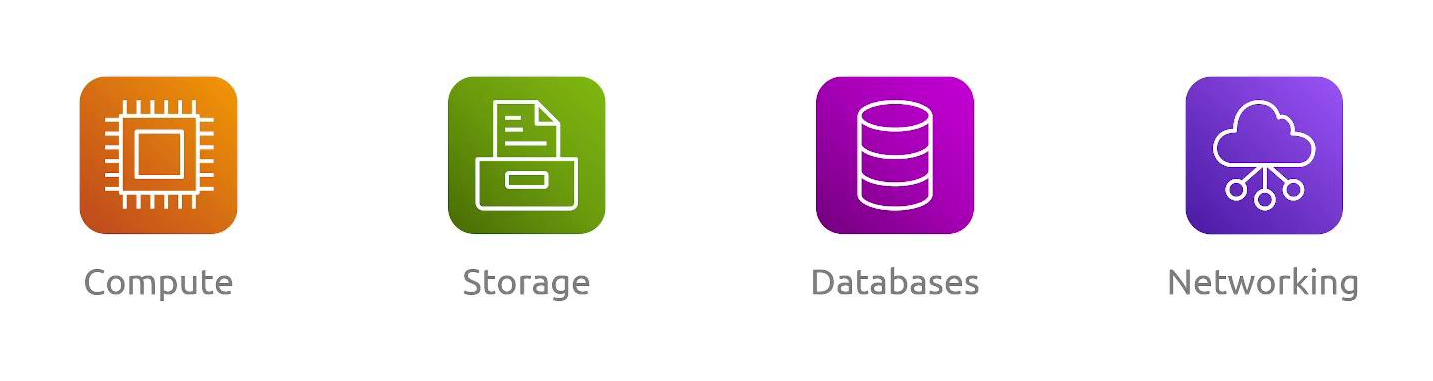
AWS Compute Services: Processing Power and Application Hosting
Compute services in AWS allow you to run applications and process data. Three primary compute services dominate most cloud architectures: EC2 (Elastic Compute Cloud), AWS Lambda (serverless computing), and Elastic Beanstalk (platform-as-a-service application hosting).
EC2 (Elastic Compute Cloud) – Virtual Machine Infrastructure:
EC2 provides resizable, on-demand compute capacity in the form of virtual machines (instances). EC2 is classified as Infrastructure-as-a-Service because you assume responsibility for managing the operating system, runtime environments, and all applications running on instances.
EC2 is ideal when your workloads require full control over the computing environment, such as running legacy applications with specific OS requirements, deploying applications requiring custom system configurations, or running workloads that cannot be decomposed into serverless functions.
With EC2, you select the instance type and size that match your performance requirements, choose an operating system (Amazon Linux, Windows, Ubuntu, etc.), and launch instances that you can connect to, configure, and manage. You have complete responsibility for operating system patches, security updates, and all software running on the instance.
AWS Lambda – Serverless Function Execution:
Lambda represents a paradigm shift from traditional server management. With Lambda, you upload code functions (typically measured in kilobytes and executing for seconds rather than minutes), and AWS automatically handles provisioning servers, scaling infrastructure, and managing the operating system. Lambda is serverless computing in its purest form—AWS abstracts away all infrastructure management.
Lambda functions are event-driven, meaning they execute in response to specific triggers such as files uploaded to S3, messages arriving in a queue, API Gateway requests, or scheduled events. Each function execution has a maximum duration of 15 minutes, making Lambda suitable for discrete, relatively short-running tasks.
Lambda charges based on actual execution time (measured in milliseconds) and memory consumption, with a generous free tier making it cost-effective for many use cases.
Elastic Beanstalk – Managed Application Platform:
Elastic Beanstalk occupies the middle ground between EC2 and Lambda. It’s a Platform-as-a-Service offering that automates much of the deployment and scaling complexity while still providing access to underlying infrastructure. You provide your application code (in languages like Python, Node.js, Java, Go, .NET, or Ruby), Elastic Beanstalk automatically provisions EC2 instances, configures load balancing, sets up auto-scaling, and manages deployments.
This service is excellent for deploying web applications quickly without managing individual EC2 instances, but it still allows customization when needed.
AWS Storage Services: Durable Data Persistence
Storage services in AWS provide mechanisms for persisting data with varying performance characteristics and access patterns. The primary storage services differ significantly in how data is accessed and organized.
S3 (Simple Storage Service) – Object Storage:
S3 is AWS’s object storage service, providing virtually unlimited, highly durable storage for any data type. In object storage, data is organized as discrete objects (files with metadata) rather than organized in hierarchical directories. Each object lives in a bucket (a container similar to a folder), is accessed via HTTP/HTTPS APIs, and is treated as an atomic unit.
S3 is ideal for storing static website assets (images, videos, PDFs), data lakes (centralized repositories of raw data), application backups, and any data that’s written once and read multiple times.
S3 provides extraordinarily high durability (99.999999999% over a year, meaning statistically only one object would be lost per billion objects stored per year). S3 can store objects ranging from bytes to terabytes and automatically distributes data across multiple geographic locations for redundancy.
EBS (Elastic Block Store) – Instance Storage:
EBS provides block storage volumes that attach to EC2 instances, functioning like traditional hard drives or SSDs. Unlike S3’s object-oriented approach, EBS volumes can be formatted with file systems (ext4, NTFS) and mounted to an operating system, making them suitable for databases, application data requiring random access, and operating system root volumes. EBS volumes are zone-specific (must be in the same Availability Zone as the EC2 instance they attach to) and provide consistent, predictable performance. You can create snapshots of EBS volumes for backup and recovery purposes.
EFS (Elastic File System) – Network File Storage:
EFS provides managed Network File System (NFS) storage that multiple EC2 instances can access simultaneously. Unlike EBS (which attaches to a single instance), EFS allows many instances to mount the same file system concurrently, making it ideal for shared application data, collaborative environments, and distributed computing workloads. EFS is particularly valuable in Linux environments where multiple application servers need access to identical file systems.
FSx – Specialized File Systems:
FSx provides managed file systems optimized for specific use cases. FSx for Windows File Server offers fully managed Windows file sharing compatible with Active Directory, while FSx for Lustre provides high-performance file storage optimized for machine learning and high-performance computing workloads where extreme throughput is required.
Storage Gateway – Hybrid Cloud Storage:
Storage Gateway bridges on-premises data centers with AWS cloud storage. It can function as a caching layer that keeps frequently accessed data local while archiving older data to S3, or as a backup appliance that transfers backup data to AWS while maintaining local access patterns.
AWS Database Services: Structured Data Management
AWS provides multiple database services optimized for different data models, consistency requirements, and scale requirements.
RDS (Relational Database Service) – Managed Relational Databases:
RDS provides fully managed relational database engines including MySQL, PostgreSQL, MariaDB, Oracle, and SQL Server. AWS handles time-consuming administrative tasks including hardware provisioning, database setup, patching of the database engine, and creating backups. RDS is appropriate for applications requiring complex relationships between data (using SQL joins), ACID compliance (Atomicity, Consistency, Isolation, Durability—guaranteeing data integrity), and complex queries. Common use cases include business applications, e-commerce platforms, and any application with structured relational data.
DynamoDB – Serverless NoSQL:
DynamoDB is a fully serverless, managed NoSQL database providing extremely fast, predictable performance at any scale. Unlike relational databases, DynamoDB uses a key-value and document data model, making it suitable for applications that don’t require complex relationships between data. DynamoDB automatically scales capacity based on demand, charges only for the data stored and the read/write operations performed, and can handle millions of requests per second. Common use cases include real-time applications (gaming leaderboards, product catalogs), IoT data collection, and session storage.
Redshift – Data Warehouse Analytics:
Redshift is a massive-scale data warehouse service designed for analyzing terabytes to petabytes of data. Unlike transactional databases (OLTP) optimized for individual record access, Redshift uses columnar storage optimized for analytical queries (OLAP) that examine many rows across specific columns. Redshift is appropriate when your primary workload involves business intelligence, data analytics, historical analysis, and complex reporting across huge datasets.
AWS Networking Services: Infrastructure Connectivity
Networking services in AWS enable communication between your resources and control how traffic flows in and out of your infrastructure.
VPC (Virtual Private Cloud) – Network Foundation:
VPC is the foundational networking service that provides a logically isolated network within AWS where you launch all your other resources. Within a VPC, you define IP address ranges (CIDR blocks), create subnets in different Availability Zones, configure route tables controlling how traffic flows, and define security rules. VPC provides complete control over network design and segmentation, enabling you to replicate traditional network architectures in the cloud.
Direct Connect – Dedicated Network Connection:
Direct Connect provides a dedicated physical network connection from your office or data center directly to AWS infrastructure, bypassing the public internet. This connection provides consistent, low-latency, high-bandwidth connectivity with predictable performance. Direct Connect is essential for organizations transferring large volumes of data, requiring guaranteed bandwidth, or needing private connectivity for compliance reasons.
Route 53 – DNS and Traffic Management:
Route 53 is AWS’s managed Domain Name System (DNS) service. Beyond simple domain name resolution, Route 53 supports advanced routing policies including latency-based routing (directing users to the nearest region), geolocation routing (routing based on user location), failover routing (automatically directing traffic away from failed resources), and weighted routing (distributing traffic across multiple resources by percentage).
API Gateway – API Management:
API Gateway enables you to create, publish, and manage REST and WebSocket APIs. It handles request routing, throttling (rate limiting), authentication, request/response transformation, and CORS (Cross-Origin Resource Sharing) configuration. API Gateway is typically used in front of Lambda functions or EC2 backends to provide a managed API interface to your application logic.
Global Accelerator – Network Performance Optimization:
Global Accelerator improves application performance by leveraging AWS’s global network infrastructure. It assigns static IP addresses to your application and uses anycast routing to direct user traffic through AWS’s optimized network backbone to your endpoints. Unlike CloudFront (which optimizes content delivery), Global Accelerator optimizes the performance of any TCP/UDP traffic for gaming, IoT applications, and other non-HTTP workloads.
Chapter 3: AWS Well-Architected Framework: Building Resilient Cloud Systems
Introduction to the AWS Well-Architected Framework
The AWS Well-Architected Framework represents a comprehensive set of architectural principles, best practices, and design patterns developed from analyzing thousands of successful AWS implementations. This framework provides a structured approach to evaluating cloud architectures against proven practices, ensuring that your systems achieve the right balance across multiple quality dimensions.
The framework is organized around six distinct pillars, each addressing a different aspect of system design. These pillars often have trade-offs—improving one dimension may create challenges in another. Successful cloud architecture requires thoughtful balancing of these competing concerns based on your specific business requirements.
Pillar 1: Operational Excellence
Operational excellence focuses on the ability to run and monitor systems effectively while continuously improving operational processes and procedures. Operationally excellent systems are managed through automation, robust monitoring, and an organizational culture of learning from incidents.
Key Practices:
- Automate routine operational tasks using infrastructure-as-code tools (CloudFormation, Terraform) and deployment automation (CodePipeline, CodeDeploy)
- Implement comprehensive monitoring and logging using Amazon CloudWatch for metrics and logs, AWS CloudTrail for API audit logging, and AWS X-Ray for distributed tracing
- Establish clear runbooks and procedures for common operational scenarios
- Implement incident response procedures with blameless post-mortems to learn from failures
- Use infrastructure-as-code practices to make infrastructure changes traceable and reversible
- Document architecture decisions and maintain up-to-date documentation
Pillar 2: Security
Security encompasses protecting systems, data, and assets through effective risk assessment and mitigation strategies. A secure architecture implements defense in depth, where multiple layers of security controls work together to protect resources.
Key Practices:
- Apply the principle of least privilege to all identity and access management configurations using IAM
- Implement strong authentication mechanisms including MFA for all user accounts
- Encrypt sensitive data both at rest (using S3 encryption, KMS encryption of databases) and in transit (using TLS/SSL)
- Use AWS KMS (Key Management Service) for centralized encryption key management
- Regularly audit access using AWS IAM Access Analyzer to identify resources shared externally
- Implement network segmentation using security groups and NACLs
- Use AWS Config to continuously monitor compliance with security standards
- Implement secrets management using AWS Secrets Manager for database passwords and API keys
Pillar 3: Reliability
Reliability refers to the ability of a system to perform its intended function correctly and consistently, and to recover quickly when failures occur. Reliable systems are designed to tolerate component failures and still operate at expected capacity.
Key Practices:
- Design applications to span multiple Availability Zones for high availability
- Implement redundancy for critical components—for example, deploy databases with Multi-AZ replication for automatic failover
- Use elastic load balancing to distribute traffic across multiple instances
- Implement auto-scaling to maintain capacity as demand changes
- Design for graceful degradation where partial failures don’t cause complete system outages
- Regularly test disaster recovery procedures through simulations and drills
- Use Amazon RDS Multi-AZ for databases to achieve automatic failover
- Implement health checks and self-healing capabilities so failed instances are automatically replaced
Pillar 4: Performance Efficiency
Performance efficiency involves using resources optimally to meet requirements and maintaining that efficiency as demand changes. This pillar requires understanding available options and selecting the right tools for your workload.
Key Practices:
- Right-size compute resources—regularly review instance types and sizes to ensure they match actual workload characteristics
- Use caching layers (Amazon ElastiCache) to reduce database load and improve response times
- Implement content delivery networks (CloudFront) to optimize content distribution globally
- Use AWS compute offerings appropriate to your workload (Lambda for event-driven workloads, EC2 for long-running applications)
- Monitor performance metrics and set up alarms for performance degradation
- Select storage types optimized for access patterns (S3 for object storage, DynamoDB for key-value access, RDS for relational queries)
- Use newer processor generations (like AWS Graviton processors) that provide better price-to-performance ratios
Pillar 5: Cost Optimization
Cost optimization involves implementing practices that reduce spending while maintaining or improving functionality. Many organizations find cost optimization challenging because it requires ongoing attention to changing prices and usage patterns.
Key Practices:
- Right-size resources by monitoring utilization and eliminating over-provisioning
- Use reserved instances or savings plans for workloads with predictable demand, providing 20-70% discounts compared to on-demand pricing
- Implement auto-scaling to match capacity to actual demand, shutting down resources during low-traffic periods
- Use AWS Trusted Advisor to identify optimization opportunities (underutilized instances, unused elastic IPs, etc.)
- Monitor costs using AWS Cost Explorer and set up budget alerts
- Leverage S3 Intelligent-Tiering to automatically move objects between access tiers, optimizing storage costs
- Eliminate unused resources (unattached EBS volumes, unused Elastic IPs, idle RDS instances)
- Use spot instances for fault-tolerant workloads that can handle interruptions, achieving up to 90% savings
Pillar 6: Sustainability
Sustainability focuses on designing cloud systems that minimize environmental impact through energy-efficient architecture and resource optimization. This includes both direct environmental impact of cloud operations and broader organizational sustainability goals.
Key Practices:
- Eliminate idle resources and implement auto-scaling to match actual demand, reducing unnecessary energy consumption
- Choose AWS Regions that use renewable energy—AWS publishes information on regional renewable energy usage
- Use serverless services (Lambda, DynamoDB, S3) which are inherently more efficient than managing compute infrastructure
- Implement monitoring to understand resource utilization and identify inefficiencies
- Design for efficiency rather than just performance—sometimes slightly slower systems that use less energy are the better choice
- Support organizational sustainability initiatives through architecture that enables reduced business travel (distributed teams, remote-first design)
Managing Trade-offs Between Pillars
The six pillars often create competing design pressures. For example:
- Security vs. Operational Excellence: Adding multi-factor authentication improves security but complicates automation and operational workflows.
- Performance Efficiency vs. Cost Optimization: Using high-performance instance types improves performance but increases costs; right-sizing for cost may impact performance.
- Reliability vs. Cost: Multi-AZ deployments improve reliability but double infrastructure costs.
Successful architecture requires understanding these trade-offs and making intentional decisions based on business priorities. A financial technology system might prioritize reliability and security above cost optimization, while a startup’s prototype might optimize for speed and cost over reliability.
Chapter 4: AWS Identity and Access Management (IAM) – Complete Security and Access Control
Foundations of AWS IAM: Core Concepts and Entities
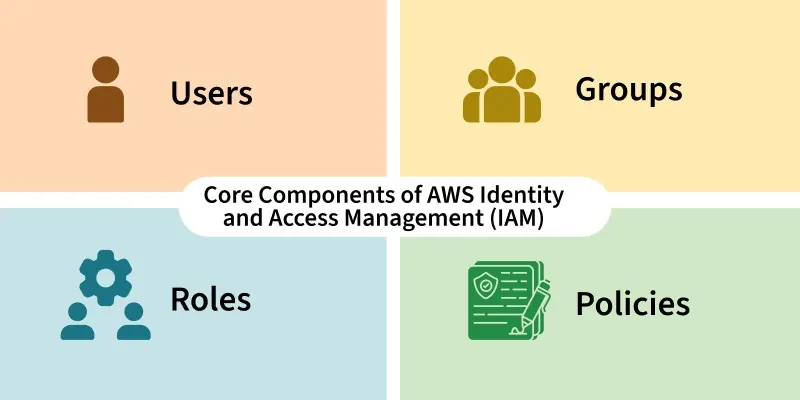
AWS Identity and Access Management (IAM) is a global service that controls who has access to AWS resources and precisely what actions they can perform. IAM is the security cornerstone of AWS, addressing both authentication (verifying who someone is) and authorization (determining what they’re allowed to do).
Primary IAM Entities and Their Roles
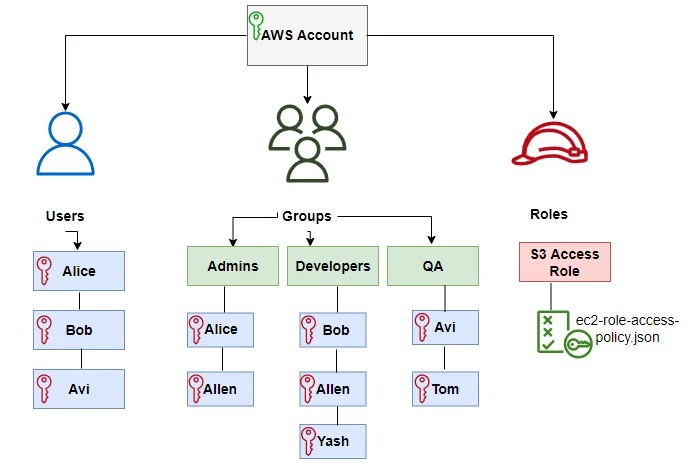
IAM Users – Individual Identity Representation:
An IAM User represents either an individual person or an application that needs to interact with AWS resources. Each user has a unique name within your AWS account and can have two types of credentials: a username and password for AWS Management Console access, and/or access keys (an access key ID and secret access key) for programmatic access via the AWS CLI and APIs.
Users are ideal for representing developers, operations engineers, and other team members who need interactive access to AWS resources.
IAM Groups – Simplifying Permission Management:
An IAM Group is a collection of IAM Users that share common permission requirements. Rather than assigning permissions to each user individually, you assign permissions to the group, and all members automatically inherit those permissions.
Groups dramatically simplify permission management—for example, you might create a “Developers” group and assign that group policy permissions for EC2 and S3, then simply add users to the group rather than configuring each user’s permissions individually. Using groups represents a best practice that dramatically reduces administrative overhead and reduces the likelihood of permission inconsistencies.
IAM Roles – Temporary Privilege Delegation:
IAM Roles represent a set of permissions without permanent credentials. Unlike users (which have permanent username/password or access keys), roles issue temporary security credentials that expire after a specified period (defaulting to one hour, with a maximum of twelve hours).
Roles are designed for two primary scenarios: granting permissions to AWS services (for example, allowing an EC2 instance to access S3, or allowing Lambda to write logs to CloudWatch), and enabling cross-account access where users from one AWS account can access resources in another account. A role has an associated trust policy that specifies which entities are allowed to assume the role.
IAM Policies – Permission Definition Documents:
Policies are JSON documents that explicitly define permissions, specifying which actions are allowed or denied on which resources. Policies are the mechanism through which you implement authorization—they answer the question “what can this user/group/role do?” A single policy can be attached to users, groups, or roles, and a single user/group/role can have multiple policies attached.
The Root Account: Maximum Power, Maximum Risk
When you first create an AWS account using an email address, that email address becomes the root account. The root account has unrestricted permissions on all AWS services and resources, including the ability to perform billing operations, close the account, and change account settings.
This superuser access is both powerful and dangerous—if root account credentials are compromised, an attacker gains complete control of your entire AWS infrastructure and billing.
Essential Root Account Security Practices:
AWS strongly recommends that you never use the root account for day-to-day operations. Instead, follow these security practices:
- Create IAM Administrator Users: Immediately after creating your AWS account, create a new IAM User and assign it the AdministratorAccess managed policy. This administrator user can perform virtually all actions (except account and billing settings) but lacks the dangerous root account permissions. Use this administrator user for all your administrative work.
- Enable MFA on Root Account: Activate Multi-Factor Authentication (MFA) on the root account, requiring a physical device (like a hardware security key or authenticator app) to verify your identity in addition to passwords.
- Secure Root Credentials: Store the root account password in a secure password manager in a physically secure location (you might even print it and keep it in a safe). Never share or use these credentials for routine work.
- Delete or Secure Root Access Keys: If the root account has any access keys (programmatic credentials), delete them unless absolutely necessary. If you must retain them, keep them in a secure location.
IAM Policy Documents: Implementing Fine-Grained Access Control
IAM Policies are JSON documents with a rigid structure. Understanding policy structure is essential for implementing proper access controls.
Policy Document Structure:
Every policy document begins with a Version element specifying the policy language version (almost always “2012-10-17”) followed by a Statement array containing one or more permission rules. Each statement includes:
- Effect: Either “Allow” or “Deny” indicating whether the statement grants or denies permissions
- Action: The specific AWS API actions being permitted or denied (e.g., “s3:GetObject” for reading S3 objects, or “ec2:StartInstances” for starting EC2 instances)
- Resource: The specific AWS resources to which the action applies, specified as Amazon Resource Names (ARNs)
- Condition (optional): Additional constraints such as requiring requests to come from a specific IP address, requiring SSL/TLS encryption, or restricting actions based on tags
Example Policies Demonstrating Access Control:
A policy granting read-only access to S3 buckets might look like:
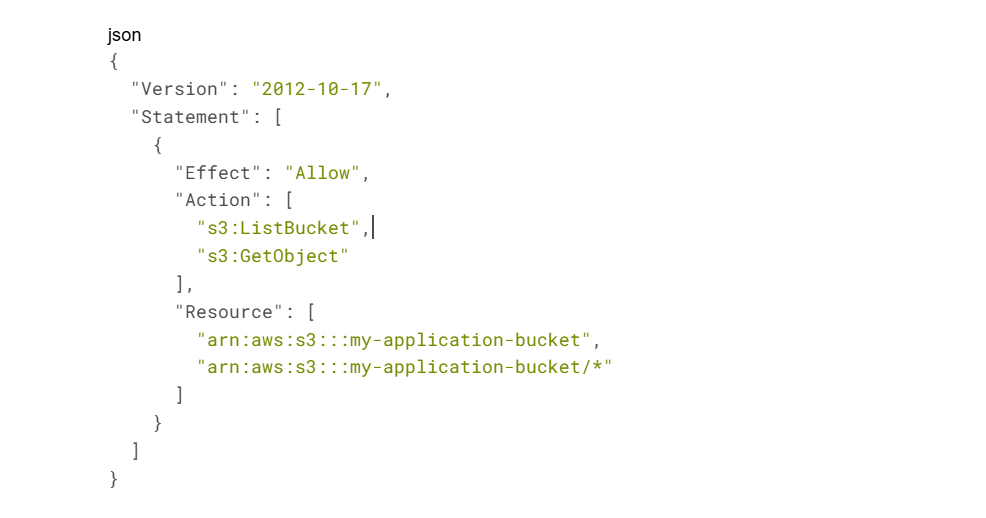
This policy allows the “ListBucket” action (listing objects in a bucket) and “GetObject” action (reading object contents) on a specific S3 bucket and its contents.
The Critical Principle: Explicit Deny Always Prevails
IAM policy evaluation follows a clear but sometimes counterintuitive principle: an explicit Deny statement always takes precedence over any Allow statement. If you have one policy allowing an action and another policy denying the same action, access is denied. Additionally, the default position is implicit deny—if no policy explicitly allows an action, it is denied.
This hierarchy is why implementing the principle of least privilege is so important. Rather than granting broad permissions and then trying to restrict them with deny statements, you should start with the minimum required permissions and only add more permissions when necessary.
Implementing Least Privilege Access and IAM Best Practices
The Principle of Least Privilege: Foundation of IAM Security
The principle of least privilege states that users should have only the minimum permissions necessary to accomplish their job responsibilities. This principle reduces risk in multiple ways: if a user account is compromised, the attacker gains access only to resources that user needs; if an application is vulnerable, the application’s privileges are limited; and if a developer makes a mistake configuring resources, the mistake affects only the intended resources.
Implementing least privilege requires discipline. It’s tempting to grant broad permissions (like “s3:*” for all S3 actions) to avoid permission-related errors, but this violates least privilege. Instead, you should:
- Identify the minimum permissions required for a role
- Create policies granting exactly those permissions
- Regularly audit permissions to remove permissions no longer needed
- Test that the permissions are sufficient before deploying to production
IAM Roles vs. IAM Permissions: When to Use Each
Many developers are confused about whether to use IAM Roles or to assign permissions directly to IAM Users through policies. The distinction and appropriate use cases clarify when each approach is best.
Direct Permission Assignment – For Permanent, User-Specific Access:
Assign policies directly to IAM Users or IAM Groups when an individual or service account needs persistent, long-term access to resources. This approach is appropriate for:
- Developers who need daily access to development environments
- Operations engineers who manage cloud infrastructure
- Service accounts that applications use for authentication
Direct permission assignment uses permanent credentials (passwords or access keys that don’t expire), making it suitable for ongoing operational needs.
IAM Roles – For Temporary, Delegated Access:
Use IAM Roles when access should be temporary, delegated to another entity, or limited in time. Roles are appropriate for:
- Granting EC2 instances temporary access to S3 (the instance assumes a role rather than using embedded credentials)
- Allowing users from another AWS account to access your resources (cross-account access)
- Providing temporary permissions for short-term tasks that shouldn’t persist after completion
- Implementing time-limited access for third-party contractors or temporary employees
Comprehensive IAM Security Best Practices
- Create One IAM User Per Individual:
Each person should have a unique IAM User so that all actions are traceable to specific individuals. Sharing IAM User credentials (like having two people use the same “shared-dev” account) makes it impossible to determine who performed specific actions, violating compliance requirements and making security incident investigation extremely difficult.
- Enable Multi-Factor Authentication (MFA) for All Users:
MFA requires two forms of authentication—something you know (password) and something you have (physical device or app). Even if an attacker obtains someone’s password, they cannot access the account without the physical MFA device. AWS supports multiple MFA methods including authenticator apps (Google Authenticator, Microsoft Authenticator), hardware security keys (YubiKeys), and SMS-based verification (though SMS is considered less secure than app-based or hardware MFA).
- Never Store Access Keys in Code:
Hardcoding AWS access keys into application code is a critical security vulnerability. If code is ever committed to a repository, exposed in logs, or accessed by an unauthorized person, the credentials provide direct access to your AWS resources. Instead:
- Use IAM Roles for applications running on EC2, Lambda, and other AWS services
- Use temporary credentials obtained from AWS Security Token Service (STS) when your application needs programmatic access
- If you must use access keys, rotate them regularly (quarterly at minimum)
- Use IAM Access Analyzer for External Access Discovery:
IAM Access Analyzer continuously monitors your resources and identifies instances where resources are shared with external principals (users or services outside your organization). This tool helps detect accidental over-sharing of resources like S3 buckets, RDS databases, or KMS keys.
- Assign Permissions to Groups, Not Individuals:
Rather than assigning policies to each user individually, create IAM Groups representing job functions (Developers, DBAs, Auditors) and assign policies to groups. Users inherit permissions from their group membership. This approach scales better and reduces the likelihood of permission inconsistencies.
- Regularly Audit IAM Permissions:
Periodically review which permissions each user has, which resources are being accessed, and whether all active users still need their current access level. AWS CloudTrail provides detailed logs of all API actions, and AWS Config tracks how resources are configured. These tools support identifying unused access that should be revoked.
- Implement Identity Provider Integration for Enterprise Environments:
If your organization uses an identity provider like Active Directory, Okta, or similar, integrate AWS IAM with your enterprise identity provider using SAML 2.0 or OpenID Connect. This approach allows employees to use their existing corporate credentials to access AWS, simplifies permission management at scale, and provides a single point of control when employees leave the organization.
Advanced IAM Concepts: Cross-Account Access and Federated Identity
Cross-Account Access: Enabling Safe Multi-Account Architectures
Large organizations often operate multiple AWS accounts for different business units, environments, or compliance boundaries. Cross-account access allows a principal (user or role) in one AWS account to access resources in another account in a controlled manner.
Cross-account access works through a combination of trust relationships and roles. The account containing the resource (the trusting account) creates a role and specifies which external account (and which principals in that account) is allowed to assume the role. Principals in the external account can then use the assume-role capability to obtain temporary credentials allowing them to act as that role.
This approach provides several advantages over alternative methods like sharing root credentials or creating users in each account: it uses temporary credentials rather than permanent credentials, it provides clear audit trails of cross-account access, and permissions can be revoked by simply removing the trust relationship.
Federated Identity: Integrating External Identity Providers
Federated identity allows users to authenticate using credentials from an external identity provider—whether that’s a corporate Active Directory installation, a cloud-based identity platform like Okta, or social identity providers like Google or Facebook. With federation, you don’t need to create and manage separate AWS IAM Users; instead, users authenticate with their existing credentials, and AWS trusts the identity provider’s assertion that the user is who they claim.
Federated identity is particularly valuable for:
- Enterprise Integration: Employees use their existing corporate directory credentials to access AWS resources
- Temporary Contractor Access: Contract workers use their company’s identity system; when employment ends, access automatically ceases
- B2B Partnerships: Partners authenticate with their own identity system and are granted appropriate AWS access
- Cost Reduction: No need to manage separate AWS user accounts and credentials
CONTACT US FOR A FREE CONSULTATION
Chapter 5: IAM Roles vs. Permissions – Strategic Access Control
Understanding the Fundamental Distinction
The difference between directly assigned IAM permissions and IAM roles represents one of the most misunderstood concepts in AWS. Both mechanisms grant access, but they serve different scenarios and have fundamentally different characteristics.
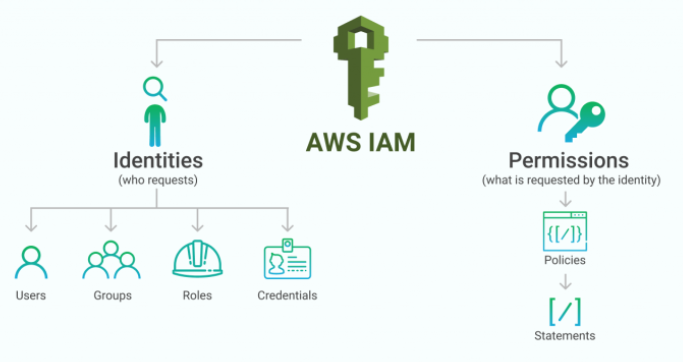
IAM Permissions (Policies Attached to Users/Groups):
When you attach a policy directly to an IAM User or IAM Group, you’re granting permanent permissions using permanent credentials. The user receives credentials (username/password for console access or access keys for programmatic access) that don’t expire. These credentials remain valid until you explicitly revoke them. This approach is straightforward for permanent, user-specific access.
IAM Roles (Assumed by Trusted Entities):
A role is not owned by anyone—it’s a set of permissions waiting to be assumed by a trusted entity. When an entity assumes a role, AWS issues temporary security credentials (lasting from 15 minutes up to 12 hours) instead of permanent credentials. The role includes a trust policy specifying which entities are allowed to assume it, and a permissions policy specifying what actions are allowed.
Real-World Scenario: Distinguishing Appropriate Use Cases
Consider this practical scenario: You have two developers who need access to development S3 buckets and RDS databases for three months.
Alice – Permanent Team Member:
Alice is a full-time employee who will work with these resources long-term. Create an IAM User named “alice” and assign her policies granting S3 and RDS access. Alice receives permanent credentials and logs into AWS using her username and password (with MFA enabled). Her access persists as long as she’s an employee.
Bob – Three-Month Contractor:
Bob is a contractor hired for a specific three-month project. Rather than creating a permanent IAM User, create an IAM Role named “contractor-access-role” with policies granting S3 and RDS permissions. Bob’s employer (or Bob’s AWS account if he works through his own company) is granted permission to assume this role. Bob can assume the role when he needs access, receiving temporary credentials valid for one hour. When the contract ends, simply remove the trust relationship allowing Bob’s identity to assume the role. Bob loses access immediately without requiring you to delete his user account or remember to remove individual permissions.
Detailed Comparison: Permissions vs. Roles
| Characteristic | Direct Permissions (Policy) | IAM Role |
| Ownership | Belongs to a specific User/Group | Belongs to no one; assumed by trusted entities |
| Credentials | Permanent (username/password or access keys) | Temporary (issued when role is assumed, expire after specified period) |
| Duration | Indefinite until explicitly revoked | Limited (default 1 hour, maximum 12 hours per session) |
| Use Case | Permanent, ongoing access for individuals | Temporary access, cross-account access, service-to-service access |
| Credential Management | Must be revoked explicitly | Automatically expire; refreshed with each assumption |
| Best Practice | For human users needing regular access | For time-limited access, service-to-service access, and cross-account scenarios |
| Revocation | Requires explicit policy removal | Revoke by removing trust relationship or disabling the role |
| Audit Trail | Shows actions performed by specific user | Shows actions performed by role along with role assumption details |
Security Implications and Best Practices
For Applications Running on AWS Services:
The most important security principle is: never embed permanent access keys in application code. Instead, use IAM Roles.
- EC2 instances should use EC2 instance profiles (which link roles to instances), allowing the instance to retrieve temporary credentials from the instance metadata service
- Lambda functions should use Lambda execution roles, automatically providing credentials to the function
- ECS tasks should use ECS task roles, similar to Lambda
- Other services like CodeBuild, Glue, and EMR support role-based access
This approach provides several security advantages: credentials are temporary and automatically rotated, there are no permanent credentials to accidentally expose, and you can audit which service accessed which resources.
For Human Users:
Create IAM Users with appropriate group membership and permissions for long-term access. Enable MFA for all users, especially those with elevated permissions. Use roles for temporary access (contractors, external consultants) or cross-account scenarios.
Practical Implementation Patterns
Pattern 1: Developer Access
Developers need consistent access to development resources. Create a “developers” group with policies for EC2, S3, CloudWatch (for logs), and similar services needed for development. Add individual developers as users to this group.
Pattern 2: Cross-Account Access
Your organization operates a central security account for logging and monitoring, and development accounts where engineers work. Create a role in the development account that the security account’s monitoring tools assume, granting them read-only access to logs and configurations.
Pattern 3: Temporary Contractor Access
A contractor needs access for six weeks. Create a role with appropriate permissions and a trust policy allowing the contractor’s identity provider (or specific user in another account) to assume the role. After six weeks, update the trust policy to revoke access. No user account deletion required.
Pattern 4: Service-to-Service Communication
Your Lambda function needs to read from an S3 bucket. Create an execution role with S3 read permissions and attach it to the Lambda function. Lambda automatically uses this role for all operations, eliminating the need for credentials in code.
About HBLAB – Your AWS & Cloud Transformation Partner

HBLAB helps businesses design, build, and operate secure, scalable architectures on AWS. With 10+ years of experience and a team of 630+ cloud, DevOps, and software engineering professionals, HBLAB supports organizations at every stage of their cloud journey—from foundational setup (VPC, IAM, networking) to modern architectures using serverless, containers, and data platforms on AWS.
HBLAB follows the AWS Well-Architected principles across all engagements, with CMMI Level 3–certified processes that emphasize reliability, security, and cost optimization. Since 2017, HBLAB has also been pioneering AI-powered solutions on the cloud, helping clients unlock advanced analytics, automation, and intelligent services on top of AWS infrastructure.
Whether you need to re-architect legacy systems to multi-AZ, implement strict IAM and least-privilege models, or build greenfield applications using EC2, Lambda, S3, and RDS, HBLAB offers flexible engagement models (offshore, onsite, dedicated teams) and cost-efficient services—often achieving up to 30% lower total cost compared with traditional vendors.
👉 Looking for a trusted partner to accelerate your AWS adoption, improve your cloud security posture, or optimize cloud costs without sacrificing performance?
GET IN TOUCH WITH HBLAB FOR A FREE CONSULTATION
Conclusion: Building Secure, Scalable Cloud Architectures with AWS
Understanding AWS fundamentals—from global infrastructure through service offerings to identity and access management—provides the foundation for building secure, scalable, and cost-effective cloud solutions. The AWS cloud platform succeeds because it provides flexibility across infrastructure-as-a-service, platform-as-a-service, and software-as-a-service offerings, allowing you to choose the abstraction level appropriate for each workload.
The Well-Architected Framework gives you a structured approach to making architectural decisions that balance operational excellence, security, reliability, performance, cost, and sustainability. IAM provides the security mechanisms to ensure that only authorized principals can access your resources and only perform the actions they need.
As you continue your cloud journey, remember that AWS provides the tools and infrastructure, but you bear responsibility for using those tools securely and effectively. Study AWS documentation, practice with test environments, and continuously learn from your operational experience. The knowledge invested in mastering these fundamentals will pay dividends throughout your career.
Read More:
– Data Integration in 2025: The Complete Guide to Unified Data Solutions
– Cloud Solutions for Businesses: 2025 Proven Implementation Guide
– AWS Singapore: Essential 2026 Guide to Data Centers, Costs and MAS Compliance