What is Database Migration
Database migration is the process of moving data, schema, and associated database objects from one database system to another. This covers moving between different database management systems (DBMS), upgrading from an older version of a database engine to a newer one, or relocating a database from one computing environment to another.
The process goes beyond copying data. It involves extracting data from the source system, transforming that data so it is compatible with the target system’s structure, and loading it into the destination. This sequence is commonly referred to as ETL: Extract, Transform, Load. A migration may also require converting the database schema, remapping table structures, adjusting data types, rewriting stored procedures, and validating the integrity of every transferred record.
In software engineering, the term also refers specifically to schema migration: the versioned, incremental modification of a relational database’s structure over the course of an application’s development lifecycle.
Where Database Migration Sits Among Migration Types
The word “migration” appears across several IT disciplines, and to a reader encountering database migration for the first time, the term can appear interchangeable with cloud migration, storage migration, or data center migration. Each migration type addresses a distinct layer of an organization’s IT infrastructure.
Data migration is broadly taken under the concept of any permanent transfer of digital information from one location, storage system, format, or environment to another. Under this umbrella term, five recognized categories exist:
- Storage migration: moving data between physical or virtual storage systems
- Database migration: transferring structured data between database management systems
- Application migration: moving applications and their data to new computing environments
- Cloud migration: shifting workloads from on-premises to cloud or between cloud providers
- Business process migration: transferring operational workflows and their data to new environments
Storage Migration
Storage migration moves data between physical or virtual storage systems. A representative example is moving files from an on-premises hard disk drive to a cloud storage bucket such as Amazon S3. The data’s content and format remain largely unchanged; the goal is a new location, not a new structure. Storage migration involves no database engine or schema, which is what separates it from database migration at the most fundamental level.
Cloud Migration

Cloud migration moves data, applications, or workloads from on-premises infrastructure to a cloud environment, or from one cloud provider to another. It is the fastest-growing migration category and a strategic decision at the infrastructure level. Cloud migration frequently triggers secondary migrations: when a business moves to the cloud, it may simultaneously perform a storage migration and a database migration as part of that broader transition.
Data Center Migration
Data center migration moves the physical or virtual infrastructure of an organization from one facility to another, relocating physical servers or moving all digital assets to a new hosting environment. The focus is infrastructure continuity. While databases reside on servers within data centers, migrating the data center is an infrastructure-level operation, not a database-level one. A data center migration, however, commonly requires a concurrent database migration.
Business Process Migration
Business process migration occurs when an organization changes the workflows and applications governing its operations, typically during a merger, acquisition, company reorganization, or enterprise software replacement. When two companies merge and operate entirely different database systems with incompatible schemas, database migration becomes a technical requirement embedded within the business process migration.
Application Migration
Application migration moves an entire application and its data from one computing environment to another, such as from a legacy enterprise system to a SaaS platform. Database migration is required within this process when the new application uses a different database engine or schema than the existing one.
How Database Migration Relates to All of These

Database migration operates at the database layer and is frequently triggered by or embedded within the other migration types. It is the technical mechanism that makes data usable in a new database environment, and the layer at which structured, engine-managed data becomes the subject of migration work.
Database Migration vs. Data Migration
Data migration is the parent concept. Database migration is one of its subtypes. Every database migration is a form of data migration, but not every data migration is a database migration.
Data migration applies to unstructured files, application data, data lakes, and storage systems. Database migration applies specifically to structured data housed within a DBMS. The distinction lies in the presence of a database engine, a schema, and relational or structured data models.
When They Overlap
The two concepts overlap when a migration project moves structured data from one DBMS to another. In this scenario, the project is both a data migration, because data is permanently moved, and a database migration, because both the source and target are database systems with their own schemas, engines, and configurations.
A practical example: a retail company migrating customer and transaction records from an on-premises SQL Server to a cloud-hosted PostgreSQL instance performs a database migration. That database migration is, by definition, also a data migration.
Where They Diverge
The divergence occurs when the data being moved does not live in a database engine. Moving a company’s archive of PDF documents from a local file server to cloud storage is data migration, not database migration. The data has no schema, no relational tables, and no database engine governing it.
Conversely, a schema migration, modifying a database’s structure during application development without relocating data to a new system, sits within the database migration domain but may not qualify as data migration in the traditional sense, because no data moves to a new location.
The Database in Database Migration
In the context of database migration, a database refers to an organized, managed collection of structured data governed by a database management system. The DBMS controls how data is stored, accessed, queried, and maintained. MySQL, PostgreSQL, Microsoft SQL Server, Oracle Database, MongoDB, and Amazon Aurora are examples of DBMS platforms in common use.
The “database” in database migration includes:
- The data itself and the schema that defines how it is organized
- Stored procedures and functions written in the database engine’s language
- Indexes that optimize query performance
- Views that present data in pre-defined formats
- Triggers that automate actions on data events
- Access controls that govern read and write permissions
All of these components may require migration, not only the raw records.
Homogeneous vs. Heterogeneous Contexts
The technical demands of a migration depend on whether the source and target databases use the same engine or different ones.
In a homogeneous migration, both systems share the same database engine. Migrating from MySQL 5.7 to MySQL 8.0 is homogeneous. The schema is structurally compatible, data type differences are minimal, and work centers on lifting data, updating configurations, and confirming application compatibility with the newer version.
In a heterogeneous migration, source and target use different database engines. Migrating from Oracle to PostgreSQL is heterogeneous. The schema must be converted, proprietary SQL syntax rewritten, and stored procedures written in PL/SQL must be rewritten in PL/pgSQL. This is the most technically demanding form of database migration, and it is where schema conversion tools and experienced database engineers are most critical.
What a Database Schema Is
A database schema is the logical blueprint that defines how data is organized within a database. It specifies:
- Which tables exist and which columns each contains, along with their data types
- Relationships between tables enforced through foreign keys
- Constraints that govern data rules such as NOT NULL or UNIQUE
- Indexes for query performance
- Views that present subsets or transformations of the underlying data
The schema is the architecture of the database. It contains the rules governing how data is stored and related. A useful analogy is the floor plan of a building: it defines where rooms are located and how they connect, but says nothing about the furniture inside. Just as remodeling a building requires changing the floor plan before moving walls, changing a database’s structure requires changing the schema before new data can conform to it.
Why the Schema Matters in Migration
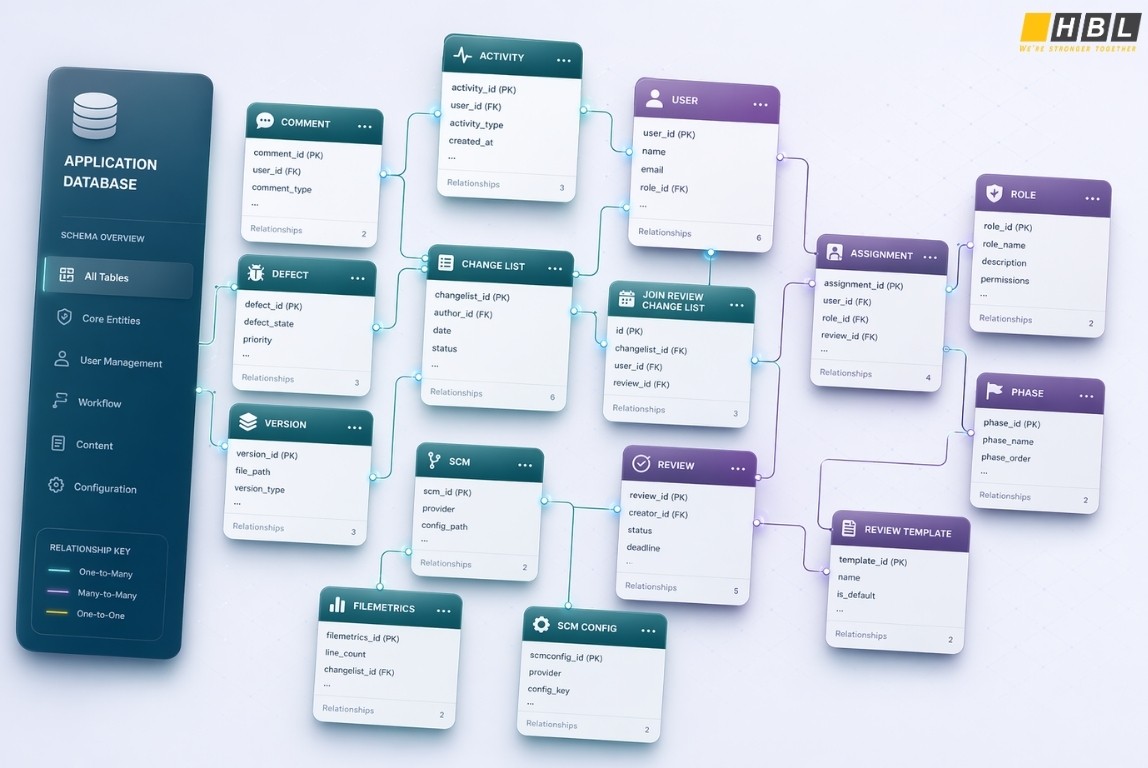
The schema is the first operational concern in any database migration. Before a single record transfers, the target database must be prepared to receive it, which means the schema must exist at the destination and must be compatible with the incoming data.
In a homogeneous migration, the source schema can often be exported and imported into the target with little modification. In a heterogeneous migration, schema conversion is a major project phase. Different database engines handle data types differently. An INTEGER in Oracle is not identical to an INTEGER in PostgreSQL. VARCHAR behaves differently across systems. DATE types carry different precision levels across engines.
Tools such as AWS Schema Conversion Tool (SCT) automate a portion of this work, but complex schemas, particularly those with extensive stored procedures or proprietary engine features, require manual review and rewriting.
Schema Migration as a Distinct Subtype
In software development, schema migration refers specifically to the versioned, incremental management of changes to a database schema over the course of an application’s life. As an application grows and new features ship, the database must update: tables are added, columns renamed, data types changed, and old structures removed.
Schema migration tools manage these changes as a sequence of ordered, versioned scripts, where each script represents a transition from one schema version to the next. This ensures the database schema stays synchronized with application code across all environments: development, staging, and production. It is also reversible; rollback scripts return the schema to a previous state when a migration introduces a problem.
How Database Migration Works
A database migration follows a structured sequence of phases. The specific tools, timelines, and technical steps vary with complexity and scale, but the core workflow is consistent across most projects.
Assessment and Planning
Before any data moves, the team assesses the source database. This involves documenting its size and structure, inventorying all tables, schemas, stored procedures, indexes, and views, identifying every application and service that connects to the database, and evaluating compatibility between the source and target engines.
During planning, the team defines the migration scope, establishes success criteria for validation, sets a timeline, and prepares a rollback plan before work begins. Insufficient assessment at this stage is the most common root cause of project failure, because the true complexity of legacy systems consistently reveals itself only when the team begins examining them in detail.
Schema Conversion
For heterogeneous migrations, the source schema is extracted and converted to the format the target engine requires. Automated conversion tools handle a significant share of this work, but complex logic, stored procedures, triggers, user-defined functions, and proprietary SQL features, typically requires manual rewriting. The converted schema deploys to the target database to create the destination environment before any data loads.
Data Extraction and Transformation
Data is extracted from the source database. When source and target have different data types or structures, the data transforms during transit. Transformation may involve renaming columns, converting data types, splitting or merging fields, or applying business rules to bring data into conformance with the target schema. ETL pipelines manage this step at enterprise scale.
Data Loading and Replication
Transformed data loads into the target database, typically in batches for large volumes. In some strategies, continuous replication runs throughout the migration period so the target stays synchronized with changes made to the source system while migration proceeds. This approach minimizes the downtime required at cutover.
Testing and Validation
Once data loads, it must be validated. Validation checks include:
- Row count comparisons between source and target
- Checksum verification of critical tables
- Data type accuracy confirmation
- Referential integrity validation to confirm foreign key relationships survived the transfer
- Application-level testing against the migrated data
>> Verification and Validation Testing
Cutover and Decommissioning
When validation is complete, application traffic redirects from the source database to the target. Depending on strategy, this cutover occurs either as a planned event with scheduled downtime or as a gradual transition with both systems running in parallel. Once the target is confirmed stable under production load, the source database is decommissioned.
Migration Strategies
Big Bang migration transfers all data in a single operation during a planned maintenance window. The source goes offline, data migrates, and the target goes live. This approach is technically simpler but carries higher risk and requires downtime.
Trickle migration, also called incremental migration, moves data in phases while both systems operate in parallel. It minimizes downtime and suits production systems that cannot tolerate service interruption. It is more demanding technically because data changes at the source must continuously replicate to the target during the migration period.
Zero-downtime migration is a specialized variant of trickle migration that uses dual-write patterns and phased schema changes to keep the application fully operational throughout. It suits high-availability systems and requires the most rigorous planning and tooling of the three strategies.
When Database Migration Becomes Necessary
Database Version Upgrades
When a database vendor releases a new major version with performance improvements, security patches, or new features, organizations upgrade their existing deployments. Moving from PostgreSQL 12 to PostgreSQL 16, or from MySQL 5.7 to MySQL 8.0, are common examples. These are among the most frequent and lower-risk forms of database migration, particularly when no engine change occurs.
Changing Database Vendors
Organizations sometimes find that their current DBMS no longer meets operational or financial requirements. A company running Oracle Database may migrate to PostgreSQL to eliminate license costs while preserving equivalent functionality. This is a heterogeneous migration and among the most technically demanding scenarios, requiring full schema conversion and application-level changes.
Cloud Adoption
When organizations move on-premises infrastructure to the cloud, their databases must move with them. This typically means transitioning from a self-managed database server to a cloud-managed database service, from on-premises MySQL to Amazon RDS for MySQL, or from SQL Server to Azure SQL Database. Cloud-managed databases provide automated backups, high availability, and compute and storage that scale independently.
Application Modernization
Legacy applications frequently run on outdated database systems. When an application is replaced or modernized, its database must migrate to a system compatible with the new application’s requirements. A hospital replacing its legacy electronic health record system, or a retailer switching ERP platforms, requires database migration as an integral part of the modernization project.
Mergers and Acquisitions
When two companies merge, they typically operate different databases, often from different vendors with incompatible schemas. Database migration consolidates these systems into a unified environment. The complexity depends on how structurally divergent the source databases are and how much historical data both organizations need to retain.
Performance and Scalability Requirements
A database adequate at one scale may fail as data volume grows. An organization may migrate from a relational database to a more scalable NoSQL system, or from an on-premises DBMS to a distributed cloud database that scales horizontally. This migration is architectural in motivation, driven by load and capacity requirements rather than cost or vendor preference.
Compliance and Security
Regulatory requirements such as GDPR, HIPAA, and PCI-DSS may require data to reside in specific environments with defined security controls. An organization may need to migrate a database to a compliant infrastructure to satisfy audit requirements or data residency obligations.
Data Consolidation
Organizations that accumulate multiple databases over time, through organic growth or acquisitions, migrate and consolidate them into a single system to reduce operational complexity, cut infrastructure costs, and improve data governance.
Need migration support? Contact with HBLAB now!
Types of Database Migration
Homogeneous Migration
In a homogeneous migration, both source and target use the same database engine. The schema is structurally compatible, and data type mappings are direct. Moving Microsoft SQL Server on-premises to Microsoft SQL Server on Azure is homogeneous. This is the least complex migration category, though it still requires planning, testing, and validation before production cutover.
Heterogeneous Migration
In a heterogeneous migration, source and target use different database engines with different data models, SQL dialects, and native feature sets. This is the most technically demanding category. It requires schema conversion, application-level changes, and often the rewriting of stored procedures and proprietary SQL logic. Examples include Oracle to PostgreSQL, MySQL to Amazon Aurora, and SQL Server to Oracle.
Schema Migration
Schema migration manages versioned changes to a database’s structure during the software development lifecycle. No data moves to a new system. Instead, the existing database’s structure changes incrementally, tables added, columns renamed, deprecated fields removed, while all existing data is preserved. This occurs continuously throughout application development and is the form of database migration that software developers encounter most frequently in their daily work.
Data-Only Migration
When the schema already exists at the target and only the data requires transfer, the operation is a data-only migration. This is faster than a full database migration because schema conversion is not required. It applies when organizations migrate data between environments that share an identical schema structure.
State-Based vs. Change-Based Migration
These are the two primary schema transformation strategies migration tools employ.
State-based migration produces scripts that describe the desired end state of the entire schema. The migration tool compares the current schema to the desired state and generates the operations needed to transition between them. This approach suits projects where schema changes are infrequent and well-planned. New engineers can understand the complete database structure from a single file without replaying a sequence of change scripts. The trade-off is that state-based tools may generate destructive operations, such as dropping and recreating a renamed table, that cause data loss if an experienced reviewer does not catch them before execution.
Change-based migration produces scripts as a sequence of ordered change operations: add column X, rename table Y, drop index Z. Each script applies in order to evolve the database from its current state to the next version. This aligns naturally with version control systems and DevOps workflows, making it better suited to active development environments where schema changes occur frequently. The trade-off is that reconstructing the full current schema state requires replaying all migration scripts from the beginning.
Many teams use both strategies at different phases of a project, depending on schema stability and development pace.
Online vs. Offline Migration
An offline migration takes the source database offline for the full duration of the transfer. Downtime is guaranteed and known in advance. This suits non-critical systems or scheduled maintenance windows where a service interruption is acceptable.
An online migration keeps the source database fully operational while migration proceeds, typically through continuous replication from source to target. It preserves availability but introduces significantly greater technical complexity. Tools such as AWS DMS, gh-ost for MySQL, and Bucardo for PostgreSQL are designed for online migration scenarios.
The Role of Database Migration Tools
Why Tools Are Necessary
Manual database migration produces inconsistent results, introduces human error, and cannot be reproduced identically across environments. At scale, databases with hundreds of tables, millions of rows, and dozens of dependent applications, manual migration is not viable. A single data type mismatch or a missed foreign key relationship can compromise data integrity across an entire database.
Migration tools automate repeatable tasks, reduce human error, enforce consistency, track change history, and minimize downtime.
Categories of Migration Tools
Schema migration tools manage incremental, versioned changes to database schemas during application development. They maintain a migration history table within the database, tracking which scripts have been applied and in what order. Flyway, Liquibase, Alembic for Python/SQLAlchemy, and Django Migrations are tools in this category. Most web frameworks include built-in migration facilities: Rails Active Record Migrations, Django ORM migrations, and Laravel’s migration system.
ETL and data transfer tools handle extraction, transformation, and loading of data from source to target at enterprise scale. Apache NiFi, Pentaho Data Integration, Talend, and Fivetran operate in this space. Built natively for cloud environments, Fivetran provides over 700 native connectors and adapts automatically to schema changes at the source.
Cloud-native migration services are managed offerings from major cloud providers:
- AWS Database Migration Service: supports both homogeneous and heterogeneous migrations with continuous replication, keeping the source database operational during transfer
- AWS Schema Conversion Tool: converts schemas between engine types
- Azure Database Migration Service: comparable capabilities within the Azure ecosystem, with built-in resilience and self-healing
- Google Cloud Database Migration Service: supports migrations to Cloud SQL and AlloyDB
Standalone open-source tools address specific engine scenarios. gh-ost performs online DDL changes for MySQL without locking tables, allowing schema alterations to apply with zero downtime. pt-online-schema-change from Percona serves a similar purpose. For PostgreSQL, pglogical and Bucardo support logical replication for online migration.
What These Tools Accomplish
Migration tools enforce that scripts apply in the correct order and execute only once. They maintain a complete history of applied migrations within the database, provide rollback mechanisms when problems surface, validate data before and after transfer, and detect schema drift, the divergence between the actual database structure and the intended schema, across environments.
Benefits of Database Migration
Performance Improvements
Modern database systems offer measurable performance advantages over older engines. Migrating from a legacy system to a current-generation DBMS produces faster query execution, improved index management, and better handling of concurrent workloads. Cloud-managed databases add purpose-built hardware optimization at the infrastructure level.
Cost Reduction
Commercial database licenses, Oracle and Microsoft SQL Server in particular, carry significant recurring costs. Migrating to open-source alternatives such as PostgreSQL or MySQL eliminates those fees. Cloud-managed database services shift infrastructure from capital expenditure to operational expenditure, aligning costs with actual usage.
Scalability
Cloud database platforms allow compute and storage to scale independently. Organizations with growing data volumes or variable traffic patterns gain elastic scalability without hardware procurement timelines.
Improved Security and Compliance
Migrating to a modern database platform provides access to current security capabilities: encryption at rest and in transit, fine-grained access controls, audit logging, and integration with identity management systems. Cloud-managed databases from AWS, Azure, and Google Cloud carry certification against SOC 2, ISO 27001, HIPAA, and PCI-DSS, reducing the scope and cost of compliance audits.
High Availability and Disaster Recovery
Cloud database services provide multi-availability-zone replication, automated failover, and point-in-time recovery as standard features. Organizations migrating from on-premises databases gain these capabilities without building their own redundancy infrastructure.
Access to Modern Features
Current database engines introduce capabilities unavailable in legacy systems: native JSON support, full-text search, geospatial data types, column-level encryption, and advanced analytical functions.
Schema Discipline and Codebase Health
Adopting schema migration practices during application development enforces versioning and documentation of every database change. This eliminates undocumented schema changes in production, simplifies onboarding for new engineers, and ensures all environments remain structurally consistent.
Challenges in Database Migration
Data Compatibility and Type Mismatches
Different database engines define data types differently. Oracle’s NUMBER can represent integers and decimals within a single column, while PostgreSQL separates these into INTEGER, NUMERIC, BIGINT, and REAL. A DATETIME in SQL Server behaves differently from a TIMESTAMP in MySQL. Unresolved type conflicts produce data truncation, conversion errors, or silent data corruption, the last being the most dangerous because it passes validation checks while containing incorrect values.
Schema Complexity and Proprietary Features
Databases accumulated over years often contain stored procedures, triggers, user-defined functions, and views written in the source engine’s proprietary SQL dialect. When migrating to a different engine, these objects must be rewritten. No tool automates this entirely. The rewriting effort scales with the complexity of the source schema.
Data Loss Risk
Any migration carries data loss risk, and that risk increases with scale, referential integrity constraints, and complex transformation logic. Records may fail to transfer completely. Foreign key relationships may break, creating orphaned records. Schema operations such as dropping a column destroy data permanently and cannot be recovered without a backup.
Downtime and Business Continuity
Traditional migration approaches require taking the source database offline during the transfer. For mission-critical systems, this is not acceptable. Zero-downtime migration strategies address this risk but require careful orchestration of dual-write patterns, staged schema changes, and continuous replication.
Application Compatibility
Applications rely on specific schema structures, query syntax, stored procedure names, and data types. A change in any of these breaks application functionality. Connection strings, ORM configurations, and SQL queries must be reviewed and updated to reflect the target environment before cutover.
Data Quality in Legacy Systems
Legacy databases frequently contain duplicate records, null values where values are required, inconsistent formatting, and records that violate business rules. Migrating unclean data produces a new database with the same quality problems as the old one.
Scale and Duration
Large databases measured in terabytes to petabytes take hours, days, or weeks to transfer. Managing data drift, the new records, updates, and deletes that occur after extraction begins, is a complex challenge that incremental replication tools address at the cost of additional infrastructure and operational overhead.
Project Management Risk
Gartner reports that 83% of data migration projects either fail or exceed their budgets and timelines. Cost overruns average 30%, and time overruns occur in over 40% of cases. Research published in the Journal of Information Security found that 90% of data migration project specifications change during execution.
Security During Transit
Data moving between source and target systems is exposed to interception. Sensitive records must be encrypted in transit using protocols such as TLS. Access controls must restrict who can initiate, monitor, or interact with the migration process. Audit logs must be maintained throughout, and compliance frameworks including HIPAA and PCI-DSS require these controls as a condition of regulatory adherence.
Best Practices for a Successful Database Migration
Begin With a Thorough Assessment
Document the source database completely before planning begins. Inventory every object: tables, indexes, views, stored procedures, triggers, sequences, and foreign keys. Profile the data to understand volumes, quality, and dependencies. Identify every application and service that connects to the source. Incomplete assessment is the most consistent root cause of migration project failure.
Clean the Data Before Migration
Do not migrate data that should not exist. Deduplicate records, resolve null values that violate target constraints, standardize inconsistent formats, and remove obsolete data.
Build and Test a Rollback Plan
Before migration begins, define and rehearse a rollback procedure. This requires maintaining the source database in a known good state, confirming backups are verified and restorable, and rehearsing the rollback in a test environment, not only describing it in a document.
Version-Control All Migration Scripts
Store every schema change and data transformation script in version control alongside application code. This creates a reproducible, auditable history and ensures the migration runs identically across development, staging, and production.
Test in a Non-Production Environment First
Run the full migration against a copy of production data in a staging environment before cutover. Test with real, representative data; problems that appear only at production scale or with production data distributions will not surface in synthetic environments.
Define Validation Criteria Before Migration Begins
Establish validation checks before data moves, not after. Row count parity between source and target, checksum verification of critical tables, referential integrity confirmation, and end-to-end application testing should all be planned and scripted in advance.
Migrate in Phases Where Possible
For large or complex migrations, a phased approach reduces risk. Begin with non-critical, lower-risk data to validate tooling and process. Define explicit go/no-go criteria at each checkpoint.
Plan for Downtime Explicitly
Decide early whether downtime is acceptable. If the business can tolerate a maintenance window, Big Bang migration is simpler to execute and easier to validate. If availability requirements preclude any downtime, invest in the tooling and expertise that online migration demands.
Communicate With All Stakeholders
A database migration affects every team that uses the affected systems. Development, operations, business analysts, and end users need to know the timeline, expected impacts, and post-migration changes. Inadequate communication leads to uncoordinated application changes, missed testing, and failures discovered after cutover.
Monitor Continuously After Cutover
Migration does not end at cutover. Post-migration monitoring should track query performance, error rates, data integrity, and application behavior for a minimum of several weeks after go-live. Query execution plans that perform well in testing frequently degrade under production load distributions, and these issues surface only after the migration is considered complete.
Choose a Migration Tool and Commit to It
Migration tooling is tightly coupled to the scripts and artifacts it generates. Switching tools mid-project is costly and disruptive, and the gains from switching rarely justify the disruption. Evaluate tools before beginning and maintain that choice through project completion.
Read more:
– Technology Implementation: What It Actually Involves and How to Get It Right
– Top Object-Oriented (OOP) Programming Languages to Learn
– Augmented Reality and Virtual Reality in Manufacturing: Applications and Proven Results