Many buyers begin in the wrong place.
They search for “best workflow automation software,” open a few comparison pages, and end up evaluating tools built for very different kinds of work. That usually leads to a shortlist that looks broad but is poorly matched to the actual process they need to automate.
A simple connector platform, a BPM suite, an RPA tool, and an AI-native orchestration platform can all appear under the same keyword. In practice, they solve different problems, require different levels of technical maturity, and carry very different implementation costs.
This guide starts with the category itself. Before comparing products, it helps to understand what each type of platform is built to handle, where each one becomes difficult to use, and what kind of workflow you are actually trying to automate.
What workflow automation software actually does
Workflow automation software executes a defined sequence of steps across one or more systems with minimal human intervention. You set the trigger, define the logic, and specify the actions that should happen under certain conditions. When the trigger occurs, the software runs the sequence you designed.
The category becomes confusing because several related terms are often treated as interchangeable, even though they describe different levels of scope.
Workflow automation
Workflow automation handles a specific sequence of tasks.
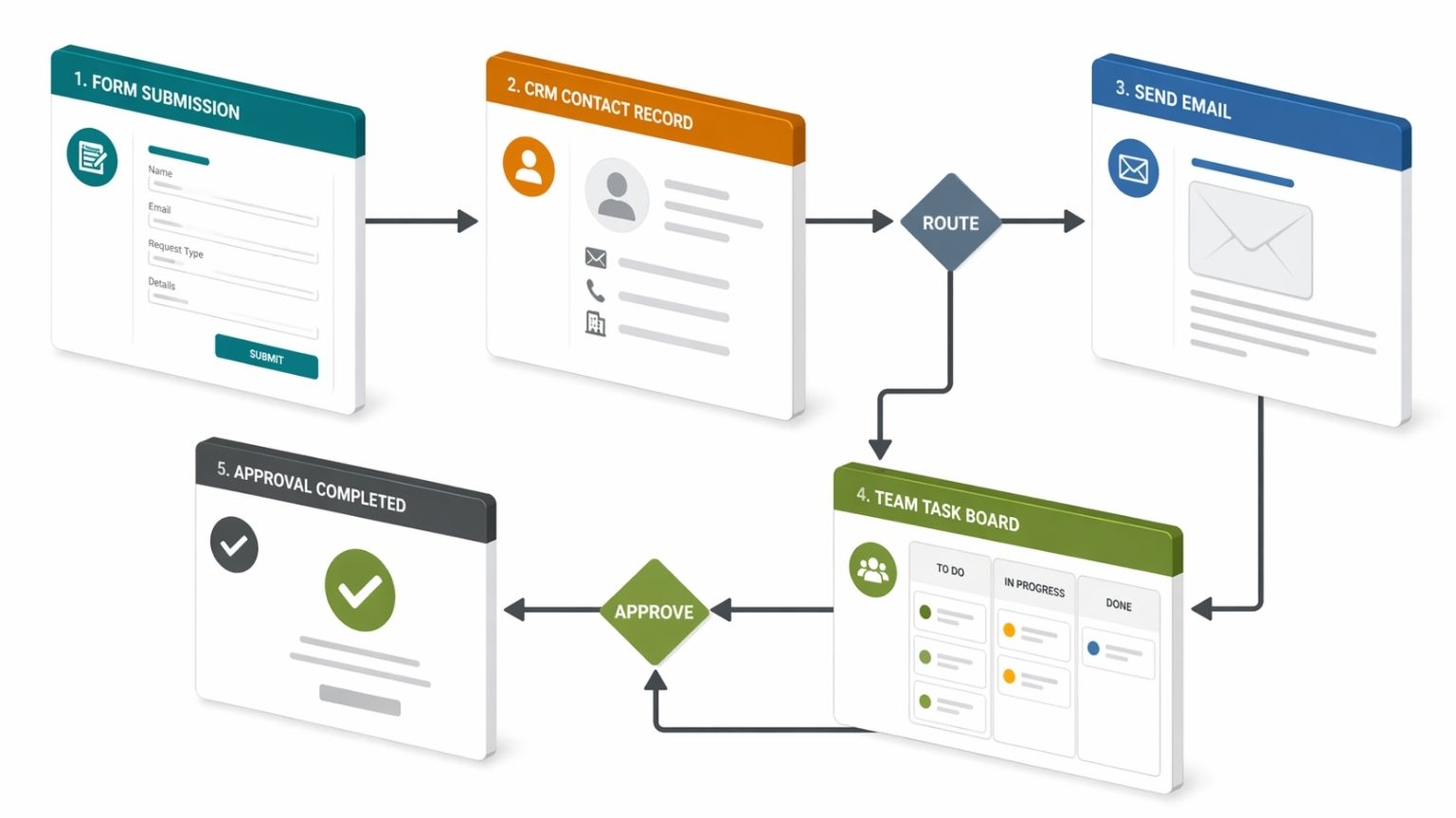
A lead submits a form. The system creates a CRM contact, assigns the lead to the right sales representative, sends a confirmation email, and posts an update in Slack. That is a workflow.
Business process automation
Business process automation, or BPA, works at a broader level. It covers the full lifecycle of a process, including exceptions, escalations, reporting, and ongoing refinement.
A single automation that moves form submissions into a CRM is not the same as a broader lead management process. Once that process includes qualification rules, routing logic, handoff to sales, status tracking, reporting, and follow-up actions across multiple systems, it moves closer to BPA.
Robotic Process Automation
Robotic Process Automation, or RPA, automates work through the user interface rather than through APIs. These tools imitate human actions on a screen. They click through menus, enter data into fields, and complete tasks inside systems that provide no reliable programmatic access.
That approach is useful when the target system cannot be integrated in any cleaner way. When an API is available, API-based automation is usually faster, more reliable, and less expensive to maintain over time.
>> Robotic Process Automation in Healthcare
iPaaS
Integration Platform as a Service, or iPaaS, connects systems through prebuilt API connectors and transformation logic. These tools move structured data between cloud services.
They can sync a CRM record to a marketing platform, trigger a Slack message when a project status changes, or write a support outcome into a spreadsheet. Their value comes from structured system-to-system coordination.
Buyers often mix up iPaaS tools and work management platforms. They overlap in some workflows, but they serve different purposes. A work management product such as monday.com is built around tasks, collaboration, and process visibility inside the platform. Automation exists within that environment, though it is not the central product category.
AI-native automation
AI-native automation addresses workflows that begin with unstructured information such as emails, scanned PDFs, voice transcripts, or free-text requests. These platforms interpret the intake, extract the relevant context, and turn it into structured decisions that trigger downstream actions.
Traditional rule-based automation depends on predictable inputs. AI-native automation becomes relevant when the intake itself needs interpretation before the workflow can move forward.
That distinction matters because many workflows break down before execution even begins. The issue is often not the sequence of actions. The issue is understanding what came in and deciding how it should be handled.
Rule-based automation vs AI-native automation
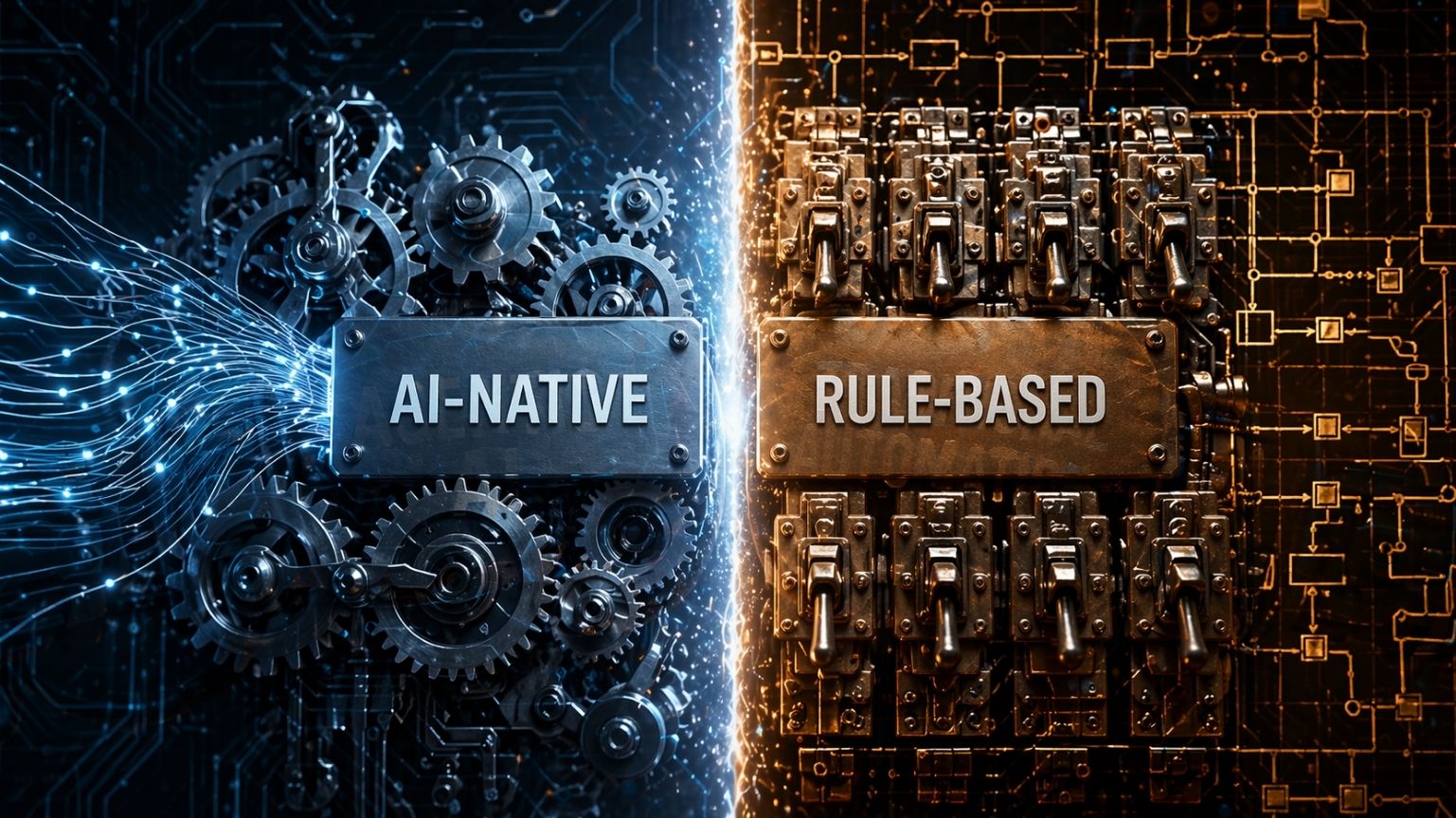
A useful way to understand the market is to separate rule-based automation from AI-native automation. The difference comes from the type of work each model can handle reliably.
Rule-based automation
Rule-based automation runs a fixed sequence of instructions when a specified condition is met.
A new lead fills out a form. The automation creates a CRM contact, assigns it by territory, sends a confirmation email, and posts a Slack notification. Every step is explicit, and every branch is mapped in advance. With the same input, the workflow produces the same result.
This model works well for structured, high-volume processes where consistency, speed, and cost control matter more than judgment. It is also easier to manage operationally. When something fails, the error usually traces back to a specific step in a specific workflow. Rollback is simpler, and pricing is often easier to forecast because many tools charge per task or execution.
For CRM updates, lead routing, approval notifications, report generation, and structured data syncs between SaaS platforms, rule-based automation remains the strongest fit.
AI-native automation
AI-native automation addresses a different kind of bottleneck.
In many enterprise workflows, the main challenge is understanding the incoming material and deciding what should happen next.
A claims processor may receive a PDF attachment, a cover letter written in inconsistent language, and several supporting documents in different formats. A standard rule-based system struggles with that kind of intake because the information arrives in a form that is difficult to map in advance. AI-native platforms can classify the packet, extract relevant fields, interpret context, and pass structured outputs into the execution layer.
That capability changes the evaluation criteria. Reliability, auditability, and control become central. If a language model makes the wrong inference inside a production workflow, the downstream cost can be significant.
For that reason, governance matters more than positioning language. In a production workflow, the model may interpret the intake, while business rules, approval requirements, escalation thresholds, and execution limits remain under human-defined policy control. AI decisions need to be observable, auditable, and correctable for the platform to be usable in serious operations.
When each model fits best
Rule-based automation is the stronger fit when inputs are structured, the workflow is high-volume, and the main priorities are consistency, cost predictability, and operational simplicity.
AI-native automation becomes more relevant when the process depends on reading ambiguous or variable input before the next step can be determined.
Four Tiers of workflow automation software
Tools are grouped by the kind of work they are designed to support.
Simple app connectors
Examples: Zapier, Make
This tier connects cloud-based SaaS applications through triggers, actions, and rule-based logic. These platforms route structured data between systems using prebuilt integrations and visual workflow builders. Setup is relatively fast, and many workflows can be created without engineering support.
This tier works well for quick operational wins such as syncing form submissions to a CRM, sending Slack messages from calendar events, or adding spreadsheet rows when a payment clears.
Problems usually appear when workflow complexity grows. High-volume processes can become expensive under task-based pricing. Multi-system orchestration becomes harder to manage. Human approvals feel improvised rather than native. Unstructured inputs sit outside the core strengths of the product.
Make handles more branching and transformation logic than Zapier, but both platforms eventually reach a ceiling when the workflow needs deeper orchestration, formal governance, or reliable handling of messy inputs.
Process and work management
Examples: monday.com, Kissflow
This tier manages workflow inside a collaborative work environment. These platforms organize tasks, approvals, and process stages for teams. They usually include automation features such as status-based task assignment, milestone notifications, and approval routing based on form fields or workflow state.
These tools are useful for human-centered processes where visibility, status tracking, and collaboration matter alongside automation. They become less suitable when the main need is deep integration across many external systems.
monday.com supports external connections, though its integration layer is more limited than a dedicated iPaaS platform. Kissflow supports more structured approval hierarchies and exception routing, yet it still does not provide the same engineering depth that integration-heavy enterprises often need.
RPA and legacy UI automation
Examples: UiPath, Microsoft Power Automate
This tier automates work inside systems that do not offer usable APIs. The software interacts with the interface the way a person would, moving through screens, entering values, and completing steps in older or closed environments.
UiPath is the enterprise-grade leader in this category, with a full platform for bot management, orchestration, and process discovery. Microsoft Power Automate combines RPA and cloud workflow automation, which makes it particularly appealing to Microsoft-centric organizations.
The tradeoff is maintenance. UI-based automation is more fragile because interface changes can break the workflow. Buyers often underestimate how much upkeep that creates over time. If an API exists, API-based automation is usually the better long-term choice.
Agentic and AI-native platforms
Examples: Workato, Vellum, Noxus
This tier supports more advanced orchestration, reasoning-heavy workflows, policy guardrails, and unstructured intake.
Workato operates as an enterprise iPaaS with deeper orchestration, human-in-the-loop support, and a broad connector layer. Vellum focuses on AI workflow orchestration and evaluation, helping teams build, test, and monitor LLM-powered pipelines. Noxus targets agentic execution, where AI agents handle multi-step tasks across systems under defined policy constraints.
>> Agentic AI Orchestration: How Multi-Agent Systems Are Coordinated at Scale
These platforms usually make sense for buyers who have already outgrown simple connector tools, deal with workflows that begin with unstructured input, and have the technical maturity to govern more complex orchestration.
What actually matters when you evaluate tools

The right shortlist depends on your operating environment, the type of input your workflows receive, the systems you need to connect, and the level of control your organization requires.
Structured vs. unstructured inputs
Structured inputs include form fields, API responses, database rows, and webhook payloads. Most workflow tools can handle these.
Unstructured inputs change the buying process. If your workflows begin with free-text emails, scanned PDFs, voice transcripts, or inconsistent document packets, many tools fall out of scope early. At that point, the evaluation shifts toward platforms with reasoning capability and governance controls.
Integration depth matters more than connector count
A large integration library does not necessarily mean the platform can support your use case in production.
A connector may support a basic trigger and a basic action while lacking support for custom authentication, pagination, webhook behavior, or reliable error handling. What matters is whether the connector for your critical system supports the specific operations your workflow depends on.
Human approvals need native workflow support
Many workflows require a genuine approval step before execution continues. If that matters in your process, confirm that the platform supports approvals natively, including notifications, escalation paths, audit logs, and time-based controls.
Some lower-tier tools can imitate approvals through conditional logic, though that is a weaker fit for processes where approvals are part of the operational design.
Governance requirements vary sharply by industry
Finance, healthcare, and government buyers often need strong audit trails, role-based access, and enforceable policy boundaries. Those controls need to exist inside the product itself, not just in vendor messaging.
If governance is a hard requirement, it should be tested directly during evaluation.
Total cost of ownership goes beyond subscription price
A low monthly price can be misleading.
A serious evaluation needs to include task or execution charges at expected volume, retries, exception handling, implementation time, training, and ongoing maintenance. A lightweight connector tool with usage-based pricing can end up costing more over a year than a more capable platform with predictable enterprise pricing.
Workflow automation tools should be selected after the business process, governance needs and integration depth are clear. The AI Roadmap whitepaper gives a practical structure for moving from tool selection to controlled AI deployment.
Top 8 workflow automation tools
1. Zapier
Category: Simple app connector
Best for: Teams in companies with fewer than 200 employees that use standard SaaS tools and need straightforward trigger-action automation without deep branching or enterprise governance.
Zapier is strongest when speed matters most. A working automation can go live quickly, and the connector library is broader than anything else in the market. It covers many niche SaaS products that other platforms do not support.
Its limits appear in workflow complexity and cost at scale. High-volume processes can drive task counts up quickly. More complex branching becomes awkward. Human approvals are limited. Unstructured input handling is outside the core design of the product.
Skip it if: You run enterprise operations, work under strict compliance requirements, process high task volumes, or need workflows with multiple layers of logic.
2. Make (formerly Integromat)
Category: Advanced app connector with data transformation
Best for: Technically capable mid-market teams that need stronger data transformation, more complex branching, and multi-step workflows that Zapier cannot handle cleanly.
Make is stronger than Zapier in routing logic, array handling, iteration, and data manipulation. It often delivers better value at higher volume, especially when workflows involve more than simple trigger-action chains.
Its weaknesses show up in readability and governance. As scenarios become more complex, the visual interface becomes harder to follow. Audit trails, role-based access, and enterprise governance remain limited compared with higher-tier platforms. The documentation also assumes more technical fluency than many operations teams have.
Skip it if: You need enterprise governance, on-premises deployment, or deeper support for unstructured input workflows.
3. n8n
Category: Open-source workflow automation and iPaaS with code extensibility
Best for: Internal tooling teams, platform engineers, and technically capable operations teams that want to run automation infrastructure on their own servers or private cloud.
n8n appeals to teams that want control and flexibility. Self-hosting removes per-task pricing, which can make the platform economical at high volume. The code node supports JavaScript and Python, which extends the workflow far beyond what prebuilt connectors can do. The open-source model also gives teams visibility into the platform itself.
The tradeoff is usability. Business users usually cannot build and maintain workflows independently. Managed deployment, enterprise support, and SLA-backed operations typically require the paid tiers.
Skip it if: You need non-technical users to manage automations without engineering support.
4. Microsoft Power Automate

Category: RPA and cloud workflow automation within the Microsoft ecosystem
Best for: Mid-market and enterprise organizations already built around Microsoft 365, especially when workflows touch Teams, SharePoint, Dynamics 365, Outlook, and legacy desktop applications.
Power Automate is often a strong economic choice for Microsoft-heavy environments. It combines API-based cloud flows with desktop RPA, and its governance layer fits naturally into Microsoft’s broader enterprise security model.
Its value becomes less clear outside that ecosystem. Connector quality is more uneven for non-Microsoft systems, and some buyers misuse the platform because it supports both cloud-based automation and desktop automation under one umbrella.
Skip it if: Your core stack sits mostly outside Microsoft, or you need iPaaS-level flexibility across a broader set of systems.
5. UiPath

Category: Enterprise RPA
Best for: Large enterprises that process high volumes of repetitive work inside systems that cannot be integrated programmatically, such as insurance claims entry, invoice processing in older ERP systems, or regulatory filing workflows in legacy environments.
UiPath stands out for centralized bot management, orchestration, scheduling, and monitoring. Its process discovery tools also help organizations identify where automation effort is likely to produce value.
The long-term issue is maintenance. UI-based automations are inherently more fragile, and interface changes in the target system require bot updates. That maintenance burden grows with scale.
Skip it if: Your target systems expose APIs, or your main challenge involves SaaS integration or unstructured intake.
6. Workato
Category: Enterprise iPaaS with orchestration depth
Best for: Mid-market and enterprise companies that need to orchestrate workflows across multiple departments and multiple systems, especially in finance, HR, sales, and support.
Workato’s recipe-based model supports looping, conditional logic, human approvals, and exception handling at a level that simple connector tools do not. It also provides governance features that matter in larger operational environments, including access controls, audit logs, and environment management.
It requires enterprise-level budget and implementation effort. Many teams need time, expertise, and often partner support to deploy it effectively. Buyers should also evaluate its AI positioning against real production evidence rather than marketing language.
Skip it if: Your team is small, your workflows are mostly straightforward SaaS-to-SaaS syncs, or your budget does not support an enterprise platform contract.
7. Vellum

Category: AI workflow development and deployment platform
Best for: Product and engineering teams building applications or internal systems that depend on language-model reasoning, such as document classification, structured extraction from text, AI content pipelines, or customer-facing AI features.
Vellum is particularly strong in evaluation and control. It supports prompt and model versioning, testing, and output evaluation in ways that address the reliability issues that make AI workflows difficult to govern.
It is not designed as a general no-code automation product for business users. Teams need engineering involvement both for implementation and for ongoing iteration as prompts, models, and workflow requirements evolve.
- MacinCloud: You can rent a virtual Mac online.
- Virtual Machine: Some users run a virtual machine (like VirtualBox) on their PC to run macOS.
Skip it if: You want simple no-code automation, or your workflows use structured data and do not require model-based reasoning.
ABOUT HBLAB
HBLAB is an end-to-end IT outsourcing and consulting partner that helps enterprises design workflow automation around the realities of their operations. Founded in 2015, HBLAB combines delivery scale with long-term AI investment, supported by its AI R&D foundation, AI Factory Lab collaboration with Vietnam National University, and Migurei, its dedicated AI subsidiary.
At the center of this capability is M-Workspace, HBLAB’s orchestration platform for specialized AI agents built around the customer’s actual business roles, process logic, and operational constraints. M-Workspace enables enterprises to deploy agents tailored for functions such as PM, BA, engineering, QA, support, and back-office operations, with each agent aligned to specific workflow requirements, decision boundaries, and connected systems.

This allows organizations to structure multi-agent workflows that improve execution consistency, reduce repetitive coordination, and strengthen control across complex environments.
Backed by 700+ employees, 50+ AI experts, CMMI Level 3, and ISO/IEC 27001, HBLAB supports enterprises that need workflow automation with both operational depth and implementation rigor.
CONTACT US FOR A FREE CONSULTATION
A practical checklist before you buy
Use these questions before starting a vendor trial or issuing an RFP.
1. Are your inputs structured or unstructured?
Start by looking at the information that enters the workflow. Structured inputs such as form fields, database records, spreadsheets with fixed columns, and API payloads are easier to automate because the format is already predictable. Unstructured inputs such as emails, scanned PDFs, voice transcripts, and mixed document packets create a different requirement: the platform must first understand the content before it can route or act on it.
If your workflow begins with messy or inconsistent intake, many standard automation tools will not be a good fit.
2. Do you need built-in human approvals?
Many workflows cannot continue automatically from start to finish. They include points where a manager, finance lead, or compliance owner must review and approve a step before execution continues. In those cases, confirm that the platform supports approvals as a native part of the workflow, including notifications, escalation rules, response tracking, and audit logs. Some tools imitate approvals through conditional logic, which may work for simple use cases but becomes weak in processes that require formal control.
3. Do your target systems have usable APIs?
Before evaluating any platform, check how your core systems can actually be connected. If a usable API exists, API-based automation is usually faster, more stable, and easier to maintain over time. RPA becomes relevant when the target system has no practical API and work must be completed through the user interface.
This distinction matters because many teams adopt UI-based automation too early, then inherit unnecessary maintenance later.
4. Do you need private deployment?
Deployment requirements should be clarified at the start, not near the end of vendor evaluation. If your organization cannot process data in a third-party cloud, SaaS-only platforms should be removed from the shortlist early. Confirm whether the vendor supports on-premises, VPC, private cloud, or air-gapped deployment. This single requirement can narrow the field quickly and prevent wasted evaluation time.
5. How complex is the process?
A simple workflow inside one team is very different from a process that spans several departments, systems, approval points, and exception paths. Connector-based tools often work well for narrow SaaS-to-SaaS automations, but they become harder to manage as the workflow stretches across more teams and more systems. The failure usually appears gradually through manual workarounds, inconsistent handoffs, and workflows that are difficult to debug.
6. Do you have compliance requirements?
In finance, healthcare, government, and other regulated environments, governance features are not optional. Audit trails, role-based access controls, approval history, and policy enforcement need to exist in the product itself. These controls should be tested in the trial environment, not assumed from sales materials or product pages.
If a platform cannot demonstrate the level of traceability your process requires, it should not stay on the shortlist.
7. What does the cost look like at scale?
Entry pricing often hides the real operating cost of workflow automation. Consumption-based platforms may look inexpensive at first, then become costly once task volume, retries, exception handling, and usage growth are factored in. A proper evaluation should model cost at two or three times current volume, not only at today’s usage. This matters especially for high-frequency workflows where pricing expands with every action executed.
8. Can you review and correct AI decisions?
If the platform uses AI to classify, extract, summarize, or route work, the key question is not whether the vendor claims high accuracy. The real question is whether your team can see what the model decided, understand why it decided that way, and intervene when needed. Production use requires observability, auditability, and a clear way to correct errors. Without those controls, AI-based workflow automation becomes difficult to trust in operational settings.
9. Is the process stable enough to automate?
Automation works best when the process itself is already understood. If the workflow is still poorly defined, varies by person, or changes from case to case without clear rules, software will not fix that problem. It will simply reproduce the inconsistency faster. Before buying a tool, confirm that the process is documented, agreed upon, and stable enough to translate into workflow logic.
10. Would a simpler platform be enough?
More advanced platforms offer more control, more flexibility, and broader capability, but they also bring more implementation effort, governance work, and cost. If a simpler platform can support the use case reliably, it is often the better starting point. The goal is to choose the platform that matches the actual complexity of your process.
Read more:
– Outsourced IT Services: Which Solutions Does Your Business Actually Need?
– 6 Reasons To Outsource Software Development
– AI Enterprise Solutions Failure: Why Organizations Invest More and Get Less