Every business today depends on technology.
A retail store uses software to track stock.
A logistics company uses tools to manage deliveries.
A healthcare clinic uses systems to handle patient bookings.
In every one of these cases, the technology itself is only part of the story. What actually determines whether it works is how the business brings it in.
What is Technology Implementation
Technology implementation is the structured process through which a business selects, configures, deploys, and integrates a new technology into its existing operations in a way that achieves a specific business outcome. It is not simply buying software and switching it on. It is a planned, step-by-step process that connects the right tool to the right problem and builds the conditions for people to use it well.
What makes this process so important is that technology projects fail often, and rarely because of the technology itself. Poor planning, unclear goals, and weak change management are the most common reasons implementations go wrong. Understanding the technology implementation process phase by phase gives businesses a much higher chance of getting it right the first time.
The Key Phases of the Technology Implementation Process
The technology implementation process follows a clear sequence. Each phase builds on the one before it. Skipping or rushing any phase creates problems that surface later, often at the worst possible moment.
Phase 1: Identifying the Problem
Needs assessment is the first phase of the technology implementation process. It is where the business defines exactly what problem it is trying to solve before looking at any technology at all.
This starts with a current state audit, a structured review of how the business currently works. The team maps existing workflows, meaning the step-by-step sequence of tasks that make up each process. They look for bottlenecks, which are points where work slows down, stacks up, or breaks down, and then identify which bottlenecks are costing the business time, money, or customer satisfaction.
Many businesses skip this phase entirely. They select technology based on a vendor’s recommendation or because a competitor is using it. This leads to tools that do not fit the actual problem, which causes user resistance and low adoption later.
Consider a logistics company experiencing delivery delays. The delays could come from driver scheduling, route planning, or manual order entry. Implementing route optimization software only addresses one of those causes. If the real problem is manual order entry, the business has spent money on the wrong solution entirely.
Measuring success before you start
Every technology implementation needs KPIs. KPI stands for key performance indicator, a measurable target used to track whether a business process is working. Examples include:
- Reducing invoice processing time by 40 percent
- Cutting customer response time to under two hours
- Reducing warehouse errors by 25 percent
These targets must be set before implementation begins, not after. Without them, there is no way to know whether the technology has delivered what the business needed.
Phase 2: Choosing the Right Software
Once the business need is clear, the selection process begins. Vendor evaluation is the phase where the business reviews available technologies and picks the one most suited to solving the identified problem.
The decision involves several practical criteria:
- Strategic fit: does the software directly address the identified business problem?
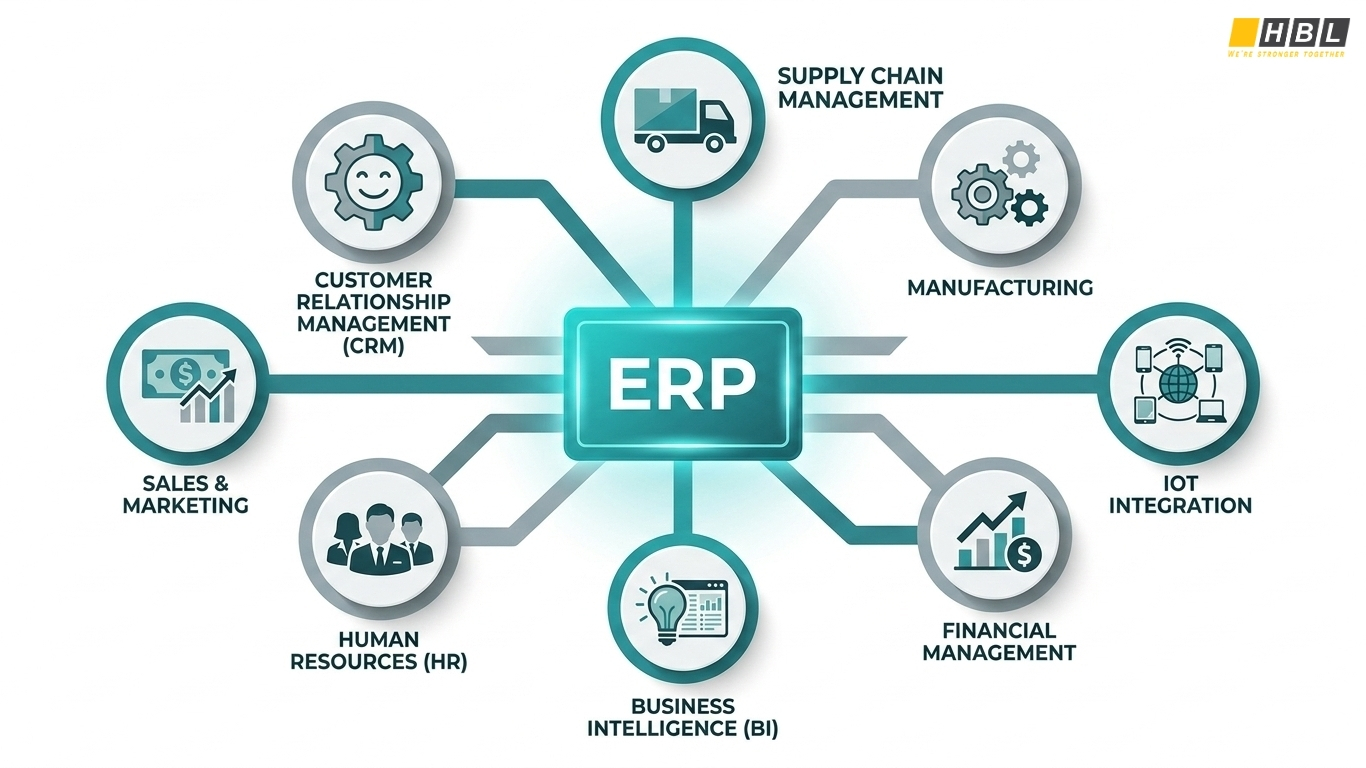
- Integration compatibility: does it connect to existing tools such as the current CRM (customer relationship management system), ERP (enterprise resource planning system), or accounting software?
- Total cost of ownership (TCO): covers licensing fees, setup costs, training costs, and ongoing support expenses
- Vendor stability and support: does the vendor offer implementation assistance, user training, and post-go-live helpdesk access?
- Scalability: can the software grow with the business, or will it need replacing within two to three years?
SMEs, meaning small to medium enterprises, often overestimate their internal IT capability. They also underestimate how difficult it can be to connect new software to legacy systems. A legacy system is any existing software or infrastructure that is outdated but still in active use. These systems often do not connect easily with modern tools, and that integration risk must be assessed during vendor selection.
A healthcare clinic selecting a patient management system, for example, must check whether that system connects via API to its existing billing software. An API, or application programming interface, is a data-sharing bridge between two software systems. If the connection does not exist, the clinic faces double data entry and potential billing errors after go-live. These are problems that should be discovered in phase two, not phase seven.
Phase 3: Building the Implementation Plan
After selecting the technology, the next phase is planning. This is where the software implementation process is formally structured. A software implementation plan is a document that outlines the project scope, timeline, assigned responsibilities, budget, and expected outcomes.
One of the most useful planning tools at this stage is the RACI matrix. RACI stands for Responsible, Accountable, Consulted, and Informed. It is a project management tool that clarifies exactly who does what and who approves what at every step of the implementation.
Lack of stakeholder buy-in at this stage is one of the most frequently cited causes of implementation failure. When department heads or end users are not consulted during planning, they disengage from the rollout. This connects directly to change management, the organized process of preparing, supporting, and guiding people through the transition from old processes to new ones. It must run alongside the technical work from the very beginning.
A retail chain planning to implement a new inventory management system must involve both the warehouse manager and the finance controller in the planning phase. If the finance controller is not consulted on reporting requirements, the system may be configured to produce inventory data that does not connect to the accounting records. That gap only surfaces after go-live, when it is far more expensive and disruptive to fix.
Resource allocation at this phase means naming specific people, not just roles. That includes internal staff, external consultants, implementation partners, and the vendor’s onboarding team. The implementation timeline must also include buffer time for delays, public holidays, and multiple rounds of testing.
Phase 4: Setting Up the System
Configuration is the process of adjusting the software’s settings to match the company’s operational rules, user roles, and approval workflows. Customization goes further, involving modifications to the software’s code or interface to meet requirements the standard version does not cover. These two terms are frequently confused. Customization is more expensive and takes longer, and a business must understand which it needs before committing to either.
Data migration is consistently identified as one of the highest-risk phases in any software implementation process. Data migration is the process of transferring existing business data from the old system into the new one. The most common problems include:
- Duplicate records
- Outdated entries
- Inconsistent formatting across fields
- Data that was never cleaned in the old system
Data quality must be audited before migration begins.
Waiting until migration is underway to discover problems is a costly mistake.
An SME moving from spreadsheets to a CRM system will often discover that the same client appears under three different name formats, or that phone numbers are stored inconsistently across records. Every one of those inconsistencies must be resolved before the data moves into the new system. If they are not, the new system begins its operational life with corrupted data.
Security must also be addressed at this phase. New access permissions, role-based access controls, and data encryption protocols must be configured during setup, not added later as an afterthought. Role-based access controls restrict what each user can see and do within the system. Data encryption converts data into a format that is unreadable without the correct key.
Phase 5: Testing the System
Testing is the process of running the configured system through a controlled set of conditions before it becomes available to all users. It covers several distinct types of checks, each serving a different purpose.
User Acceptance Testing, or UAT, is where actual end users test the system against real business scenarios to verify it does what they need it to do. UAT is performed by the people who will use the system every day.
Integration testing checks whether the new system correctly exchanges data with all the other software it is connected to. Performance testing verifies that the system handles the expected volume of transactions, users, and data without slowing down or failing.
Testing is the phase most frequently compressed when project timelines run late. Defects discovered during testing cost far less to fix than defects discovered after go-live. A payroll system that calculates overtime incorrectly during testing can be corrected before any salaries are paid. If the same error surfaces after the system is live, it generates incorrect payments, compliance issues, and serious employee distrust.
A sandbox environment is the tool that makes safe testing possible. A sandbox is a controlled testing space that mirrors the production system but does not affect live data. Users practice real workflows in the sandbox before the system goes live, building the confidence and familiarity they need before the switch.
Phase 6: Preparing Your Team to Use the New System
Technology implementation does not end at go-live. End-user training must be structured, role-specific, and completed before employees use the live system.
Generic training that covers every feature equally is ineffective. Training should be built around the specific tasks each user role performs. One particularly useful approach is contextual guidance, step-by-step support embedded directly in the application that appears at the exact moment a user needs it, rather than requiring them to search a separate training manual.
Employee resistance to change is the most commonly reported obstacle in any technology implementation. It comes from unfamiliarity, from fear of making errors in a new system, and from uncertainty about how the new process affects daily routines. The way to address resistance is through early involvement, not late-stage training sessions delivered the week before go-live.
A customer service team that has used the same ticketing system for four years and is switching to a new one should be involved in testing and should complete task-based training in a sandbox before go-live. Releasing them onto a live system without prior hands-on practice increases error rates and decreases confidence across the team.
A champion user model addresses this effectively. Champion users are one or two experienced staff members in each department trained to an advanced level so they can support their colleagues after go-live. This reduces the burden on the IT team and creates peer-to-peer support networks within the organization.
Phase 7: Launching the System
Go-live is the moment the new system becomes the operational system of record for the business. Before go-live is approved, several conditions must be confirmed:
- UAT complete with documented sign-off
- All users confirmed as trained by their department heads
- Helpdesk support ready to handle issues
- A rollback plan defined and agreed upon
A rollback plan is a pre-agreed procedure to revert to the previous system if the new one fails to function at an acceptable level within the first hours or days. It is a professional safeguard that every responsible implementation includes.
After go-live, the business must measure actual performance against the KPIs set in Phase 1. This closes the loop on the entire technology implementation process and confirms whether the technology is delivering its intended business outcome.
Most businesses declare implementation complete at go-live and disband the project team. This is the wrong moment to close the project. The first 30 to 90 days after go-live are when most adoption failures, user workarounds, and data errors appear.
A structured hypercare period addresses this directly. Hypercare is a defined post-launch period, typically 30 to 90 days, during which the vendor or implementation partner provides elevated support.
Common Rollout Strategies for Technology Implementation
So, now that the phases are clear, there is one more major decision to address: how go-live is actually executed. The rollout strategy determines how the transition from old system to new system happens in practice. Three main strategies are used, and each one suits a different set of conditions.
Strategy 1: Phased Rollout
A phased rollout introduces the new system gradually, either by department, by location, by user group, or by module. The system does not go live for everyone at once. Each phase has its own go-live date.
This strategy is appropriate when:
- The business has multiple departments with different workflows
- The technology being implemented is complex
- User adoption risk is high
- The business cannot afford a full operational disruption
The main risk is that the legacy system must remain operational during the transition, which creates duplicate processes and requires temporary data synchronization between old and new systems.
A manufacturing company, for example, rolls out a new ERP system first in the accounting department in month one, then in warehouse operations in month two. Problems identified during the accounting rollout are corrected before the warehouse rollout begins.
This strategy is also the standard approach for businesses exploring how to implement robotic process automation. RPA, or robotic process automation, is software that automates repetitive, rule-based tasks that humans previously performed manually. Because RPA bots are typically deployed by process or department, a phased rollout is the default and most practical approach.
Strategy 2: Big Bang Rollout
A big bang rollout switches the entire organization from the old system to the new one on a single go-live date. Everyone moves at once.
This strategy is appropriate when:
- The business is small and operations are straightforward
- The old and new systems cannot run in parallel
- A hard deadline such as a regulatory change or contract end date forces the switch
The risk is significant. If something goes wrong at go-live, it affects the entire organization simultaneously. There is no partial operational buffer and no group still running the old system to fall back on.
This strategy suits small, single-location businesses replacing a limited tool with a SaaS solution. SaaS, or Software as a Service, refers to cloud-hosted software accessed via subscription. It also suits businesses with a culture that is genuinely ready for rapid change.
Strategy 3: Pilot Rollout
A pilot rollout deploys the technology to a small, representative group of users first. That group uses the live system, provides feedback, and the system is adjusted before the broader rollout reaches the rest of the organization.
The pilot group should run the system for a minimum of 30 days, long enough to encounter real edge cases and generate feedback that actually improves the system.
A retail chain with 12 branches, for example, implements a new point-of-sale system at one branch first. That branch’s staff identifies two workflow gaps the vendor missed during configuration. Both are fixed before the rollout reaches the remaining 11 branches. Errors are caught at low scale, not enterprise scale.
Businesses working on how to implement a structured innovation process across departments benefit particularly from this approach. When piloting idea management platforms or collaborative workflow tools with one department first, the business can refine the setup, communication, and training approach before scaling to the wider organization.
A Note on Hybrid Strategies
A hybrid strategy combines two approaches. The most common hybrid for SMEs is a pilot followed by a phased rollout. The pilot validates the system in a live environment. The phased rollout then manages the broader deployment at a controlled pace. For complex or high-risk implementations, this combination reduces overall risk significantly.
Primary Technology Trends in 2026
The trends represent the technologies that small to medium enterprises (SMEs) are actively selecting, planning for, and rolling out right now. Each one comes with the same phases and rollout decisions already covered in this article.
Trend 1: AI-Powered Automation
Artificial intelligence, or AI, is now operational in SME environments, not experimental. SMEs are using AI to automate customer service responses, assist in hiring decisions, and process routine data entry tasks.
The key implementation challenge is data quality. AI tools must be configured with clean, accurate business data to function reliably. An SME that has not addressed its data quality issues in Phase 4 will get poor AI outputs in live operation.
In 2026, SMEs are moving away from general-purpose AI tools toward specialized tools built for specific business functions. One important term here is agentic AI. Agentic AI is AI that does not just respond to prompts but takes sequential actions based on business context, such as predicting customer needs and initiating follow-up workflows automatically. This level of capability requires well-structured, integrated data to function correctly.
Trend 2: Cloud Migration and Hybrid Infrastructure
Cloud computing refers to accessing software, storage, and computing power over the internet rather than through hardware installed on-site. Most SMEs in 2026 operate in a hybrid environment where some systems are cloud-hosted and some remain on-premises.
Full cloud migration is not always the right decision immediately. Legacy systems may not be cloud-compatible, and the cost and disruption of migrating everything at once often exceeds the immediate operational benefit. When an SME selects a new software system, cloud compatibility and API integration with existing on-premises systems must be evaluated explicitly in the vendor selection phase.
Trend 3: Low-Code and No-Code Platforms
Low-code platforms are software development tools that allow non-technical staff to build or configure business applications using visual, drag-and-drop interfaces rather than written code. No-code platforms require no programming knowledge at all.
For SMEs without a dedicated IT department, these platforms lower the barrier to software implementation significantly. The caveat is that low-code and no-code tools carry risks around scalability, security, and vendor lock-in. Vendor lock-in means the business becomes dependent on one provider’s proprietary system, making it difficult and costly to switch later. This risk must be considered carefully during the vendor selection phase.
Trend 4: Cybersecurity
Cybersecurity is the set of practices, tools, and policies used to protect digital systems, data, and networks from unauthorized access, theft, or damage. It is no longer a layer added after implementation. It must be built in from the start.
SMEs are primary targets for cyberattacks. Research consistently shows that 43 percent of all cyberattacks target small businesses. Security design must begin in Phase 1 of the technology implementation process, not at go-live. This includes:
- Multi-factor authentication (MFA): requires two or more forms of identity verification to access a system
- Role-based access controls: restrict what each user can see and do within the system
- Data encryption: converts data into a format unreadable without the correct key
>> Cybersecurity Standards: Top 5 Frameworks Every Organisation Needs to Know
Trend 5: Real-Time Data Analytics
Data analytics tools allow businesses to collect, organize, and interpret operational data in real time so that decisions are based on actual performance figures rather than estimates or delayed reports.
In 2026, tools such as Microsoft Power BI and Google Looker Studio sit within the budget of most SMEs. This level of capability was previously available only to large enterprises.
The implementation implication is important: these tools require that the business’s other systems, including the CRM, ERP, and inventory platform, are already integrated and producing clean, consistent data. Reliable analytics cannot come from fragmented or dirty data. Data integration and quality, addressed in Phase 4, is the prerequisite for analytics to work at all.
Every technology trend above, whether AI automation, cloud migration, low-code development, cybersecurity, or analytics, follows the same path: a structured assessment of the business need, careful vendor selection, a planned rollout, trained users, and a post-launch review against measurable goals. Technology implementation is an ongoing business discipline, and the businesses that treat it that way consistently outperform the ones that do not.
Read more:
– Cloud Migration in Australia: What Businesses Need to Know
– Top Object-Oriented (OOP) Programming Languages to Learn in 2026
– Outsourced IT Services: Which Solutions Does Your Business Actually Need?