If you’ve hit the dreaded “You’ve reached your limit” message on ChatGPT’s free tier, you’re not alone.
With a restrictive cap of roughly 10 messages every five hours for advanced models, free users constantly bump against invisible walls that disrupt workflows and derail productivity.
Beyond these message limits, ChatGPT’s free version forces automatic downgrades to less capable models, offers limited real-time information access, and provides weak citation capabilities for research work.
These limitations have driven professionals, students, and power users to seek chatgpt alternatives that solve specific pain points while offering robust free tiers or specialized capabilities.
This guide examines the top four ChatGPT alternatives in depth, providing usage strategies and clear recommendations to help you make an informed choice.
Find Your Perfect ChatGPT Alternatives
Best for Writing and Advanced Coding: Claude 3.5 Sonnet
Best for Research and Real-Time Citations: Perplexity AI
Best for Ecosystem Integration: Microsoft Copilot & Google Gemini
Best Free High-Performance Alternative: Claude.ai
>> See more: The Secret to Making ChatGPT Actually Write Like a Human [2026 Guide]
Claude 3.5 Sonnet: Exceptional Writing and Coding
What Makes It Special
Claude 3.5 Sonnet delivers nuanced, human-like writing with sophisticated tone control. It excels at complex code generation, debugging, and technical explanations.
Its 200,000 token context window handles entire codebases or long documents that would overwhelm ChatGPT.
Key Strengths
For Writers: Claude demonstrates marked improvements in understanding nuance, humor, and complex instructions. It produces high-quality content with natural, relatable tone.
For Coders: In internal evaluations, Claude 3.5 Sonnet solved 64% of problems compared to Claude 3 Opus’s 38%. The model handles code translations with ease, making it effective for updating legacy applications.
For Visual Tasks: Claude surpasses previous models in interpreting charts, graphs, and imperfect images such as poorly scanned documents.
Limitations
The model occasionally exhibits excessive caution with certain topics. Claude lacks real-time web search capabilities, making it less suitable than Perplexity AI for queries requiring current information.
How to Get Started with Claude
Step 1: Access the Platform Visit claude.ai or download the iOS mobile app. The free tier provides generous usage compared to ChatGPT.
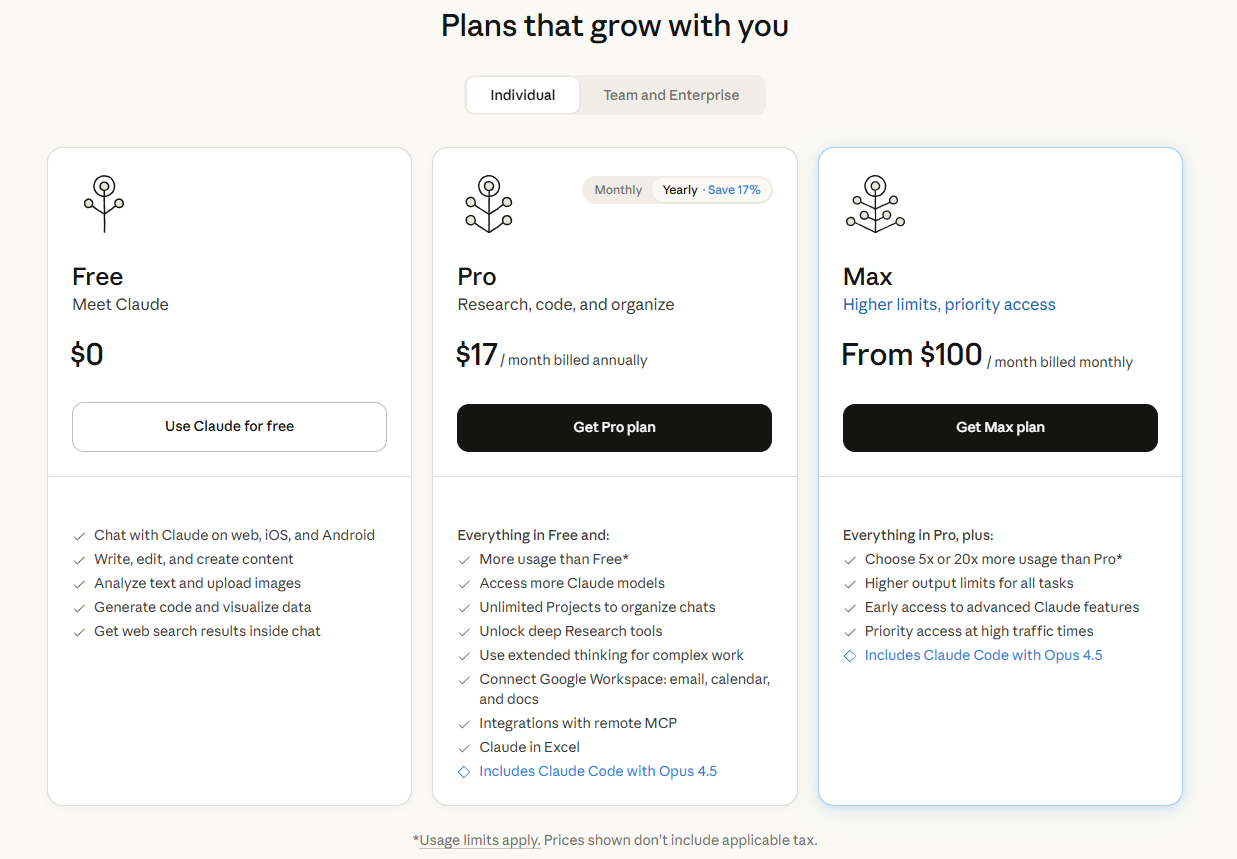
Step 2: Understand Pricing
Step 3: Master Effective Prompting
Claude responds best to detailed, specific prompts that clearly outline the task structure and desired output format.
For Coding Tasks: Provide complete context including relevant code snippets, error messages, and your specific debugging attempts.
Example Coding Prompt:
“I’m building a Python Flask application with SQLAlchemy. The following code generates a ‘DetachedInstanceError’ when trying to access user.posts after the session closes. Here’s the relevant code: [paste code]. Explain why this error occurs, then provide a corrected version using either eager loading or appropriate session management.”
For Writing Tasks: Specify tone, audience, and format constraints to help Claude match your exact needs.
Example Writing Prompt:
“Write a 300-word blog post introduction for B2B SaaS marketers explaining the ROI benefits of investing in customer success teams. Use a professional but conversational tone. Include a compelling hook, two concrete statistics, and end with a transition sentence.”
Step 4: Optimize Your Workflow
Break complex projects into discrete steps rather than asking Claude to handle everything at once.
Provide iterative feedback to refine outputs based on your preferences.
When debugging code, share both the erroneous code and the expected behavior.
Choosing an AI tool is only one part of enterprise AI adoption. The AI Roadmap whitepaper helps leaders decide how tools should fit into data access, workflow design, governance and measurable business outcomes.
Perplexity AI: Real-Time Research With Automatic Citations
What Makes It Special
Perplexity AI operates as a conversational search engine that performs real-time web searches for each query, crawling live content to provide up-to-date information.
Every response includes automatic source citations with direct reference links.
Key Strengths
For Researchers: The platform scored 93.9% accuracy on the SimpleQA benchmark, far exceeding leading models in factuality. The automatic citation system saves substantial time tracking down and verifying references.
Deep Research Feature: When activated, the system spends two to four minutes conducting iterative research that would typically require hours of manual effort.
Growth and Reach:
- Supports 46 languages in 238 countries
- Processes 780 million monthly queries
- 22 million active users across web and mobile
Limitations
Like all AI systems, it can occasionally generate incorrect information or misinterpret sources.
Complex topics may be oversimplified in synthesis.
The free tier enforces significant restrictions on queries and AI model access.
How to Get Started with Perplexity
Step 1: Access the Platform Visit perplexity.ai through web browsers or download the mobile app.
Step 2: Understand Pricing
- Free tier: Capable research functionality with daily limits
- Pro subscription: Unlocks GPT-4, Claude 3.5, and Gemini 2.0 Pro
- Enterprise Pro: Per-seat pricing with additional controls
Step 3: Master Effective Querying
Frame queries as specific questions rather than vague topics to receive more targeted responses.
Example Research Query:
“What are the latest FDA-approved treatments for metastatic melanoma as of 2025, including their approval dates, mechanism of action, and comparative efficacy data from clinical trials?”
Example Comparative Query:
“Compare the tax implications of traditional 401(k) versus Roth IRA contributions for a single filer earning $150,000 annually, considering 2025 contribution limits and current tax brackets.”
Step 4: Leverage Advanced Features
- Upload files: Include PDFs and images as part of prompts for multimodal analysis
- Use Copilot feature: Adds clarifying questions before searching to refine ambiguous queries
- Organize with Collections: Group threads by project or topic for easy revisiting
Step 5: Verify Results
Review cited sources directly rather than accepting synthesized answers at face value, particularly for critical decisions. Use Perplexity as a research assistant that accelerates information gathering.
Microsoft Copilot: Native Integration Across Windows and Microsoft 365
What Makes It Special
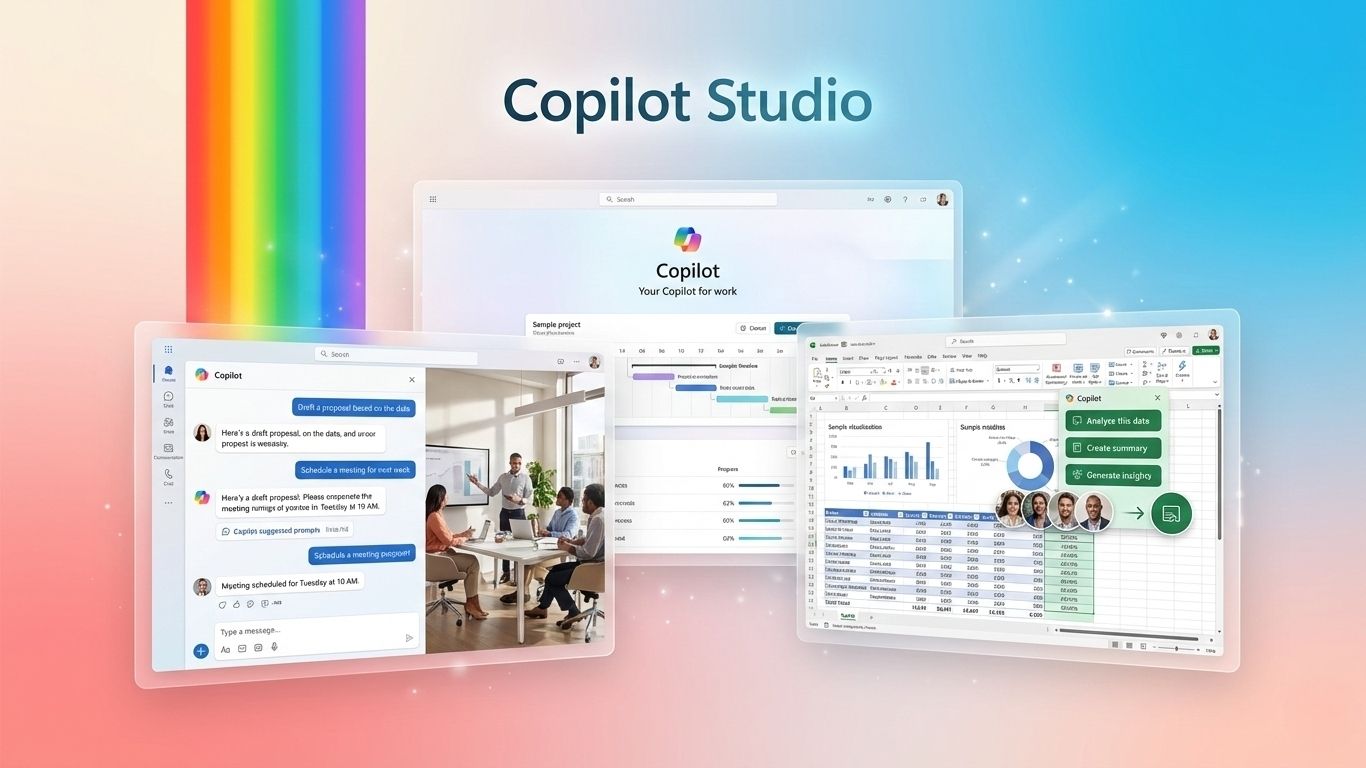
Microsoft Copilot integrates OpenAI technology including GPT-4 deeply into Windows, Edge browser, and Microsoft 365 applications.
The Work IQ intelligence layer enables Copilot to know each user, their role, and their company context, delivering personalized responses that reference internal documents.
Key Strengths
For Microsoft Users: Search calendars by meeting organizer, retrieve information from OneDrive files, draft emails based on meeting notes, and generate Excel formulas without leaving your workflow.
For Enterprises: Robust governance, compliance, and security features. Organizations can deploy custom agents through Copilot Studio and monitor usage through comprehensive analytics.
Performance Improvements: Users show three times more thumbs-up responses and a 17% increase in satisfaction over six months.
Limitations
Copilot’s value diminishes substantially for users outside the Microsoft ecosystem. Requires Microsoft 365 subscriptions for full functionality. Less advantage for creative writing, complex coding projects, or specialized research compared to dedicated alternatives.
How to Get Started with Microsoft Copilot
Step 1: Access the Platform Available through Windows 11, Edge browser, or directly within Microsoft 365 applications. Mobile app extends to iOS and Android devices.
Step 2: Understand Pricing
- Personal accounts: Basic Copilot functionality
- Microsoft 365 Copilot: $30/user/month for advanced features
- Free tier: Access to GPT-4 powered responses, web search, image generation
Step 3: Master Contextual Prompting
Reference specific documents, emails, or meetings to leverage the platform’s contextual awareness.
Example Productivity Prompt:
“Review my last three emails from the marketing team about the Q1 campaign. Summarize the key decisions made, outstanding action items, and any unresolved questions. Format the summary as a bulleted list I can share in tomorrow’s team meeting.”
Example Data Analysis Prompt:
“In the attached sales data spreadsheet, identify the top three performing product categories by revenue growth quarter over quarter. Create a bar chart visualization showing these trends and suggest two potential factors driving the growth.”
Step 4: Maximize Integration
For complex requests spanning multiple documents, explicitly list the files or sources you want Copilot to consider.
Enable connected apps in settings to allow Copilot to access Gmail, Calendar, and other integrated services.
Take advantage of agent capabilities for specialized workflows through Copilot Studio.
Google Gemini: Multimodal Intelligence With Workspace Integration
What Makes It Special
Google Gemini 2.0 Pro represents Google’s most advanced AI model, achieving state-of-the-art performance across reasoning, multimodal understanding, and coding benchmarks.
The model scored 91.9% on GPQA Diamond and demonstrated PhD-level reasoning.
Native integration with Google services provides seamless connectivity across Drive, Docs, Gmail, Sheets, Calendar, Maps, and YouTube.
Key Strengths
For Google Users: The side panel feature in Drive, Docs, Sheets, Slides, and Meet provides contextual AI assistance without leaving your workspace.
For Learners: Guided learning features break down complex concepts step by step rather than simply providing answers.
For Creators: Supports Imagen 4 for text-to-image generation and Veo 3 for creating eight-second videos with sound.
Massive Context: Supports context windows up to 1 million tokens in preview, enabling analysis of extraordinarily large documents.
Limitations
The platform faced controversy around image generation bias and text response bias.
Inconsistent performance across different query types reported by some users.
The pricing structure with multiple tiers can confuse new users. Maximum value requires commitment to Google’s ecosystem.
How to Get Started with Google Gemini
Step 1: Access the Platform Visit gemini.google.com or download the mobile app.
Step 2: Understand Pricing
- Free tier: Gemini 2.0 Flash with daily usage limits
- Google AI Pro: $19.99/month for higher limits and Gemini 2.0 Pro access
- Google AI Ultra: Unlocks Deep Think reasoning mode, Veo 3 video generation
Step 3: Leverage Workspace Integration
Reference your existing documents and data when prompting within Google Workspace applications.
Example Workspace Prompt:
“Review the project timeline document in my Drive and the last five emails with subject line containing ‘Budget Review.’ Create a status update summarizing our progress against milestones, any budget variances, and upcoming deliverables for the next two weeks.”
Step 4: Use Guided Learning
For learning scenarios, ask Gemini to teach you concepts step by step.
Example Learning Prompt:
“I’m trying to understand how gradient descent optimization works in neural networks. Don’t just explain it; instead guide me through discovering the concept step by step. Start by asking me what I already know about derivatives and optimization.”
Step 5: Expand Capabilities
Enable connected apps in settings to extend Gemini’s awareness across Calendar, Keep, Tasks, Messages, Phone, and Maps.
Use the visual guidance feature by sharing your camera for real-time visual cues on your screen.
Making Your Choice: Quick Decision Guide
Choose Claude 3.5 Sonnet if:
You prioritize writing quality, need advanced coding assistance, or work with large documents requiring extensive context windows.
Choose Perplexity AI if:
You conduct frequent research requiring source citations, need current web information, or work in journalism, academia, or analytical roles.
Choose Microsoft Copilot if:
You work extensively within Microsoft 365 applications or already pay for Microsoft 365 subscriptions.
Choose Google Gemini if:
You rely heavily on Google Workspace applications, need multimodal capabilities for images and video, or value guided learning features.
FREE CONSULTATION ON AI SOLUTIONS
Final Thoughts
The question “Is there a better alternative than ChatGPT?” lacks a universal answer because “better” depends entirely on your specific use case.
For research work requiring citations, Perplexity objectively surpasses ChatGPT.
For sophisticated code generation with massive context requirements, Claude delivers superior results.
For users embedded in Microsoft or Google ecosystems, native integrations provide productivity advantages ChatGPT cannot match.
Start with free tiers, test specific use cases that matter to your work, and upgrade strategically based on demonstrated value rather than marketing promises.
Frequently Asked Questions
1. Is there a better alternative than ChatGPT?
“Better” depends entirely on your specific needs.
For research and citations: Perplexity AI surpasses ChatGPT with real-time web search and automatic source citations.
For advanced coding and writing: Claude 3.5 Sonnet outperforms ChatGPT with a 200,000 token context window and superior code generation.
For ecosystem integration: Microsoft Copilot and Google Gemini offer advantages ChatGPT can’t match if you work within those platforms.
ChatGPT remains solid for general-purpose use, but specialized alternatives often deliver better results for specific tasks.
2. Which is the No. 1 AI in the world?
There’s no single “number one” AI as different models excel in different areas.
- For reasoning tasks: Google Gemini 2.0 Pro and Claude 3.5 Sonnet lead with 91.9% on GPQA Diamond.
- For research accuracy: Perplexity AI achieved 93.9% on the SimpleQA benchmark.
- For coding: Claude 3.5 Sonnet scored 49% on SWE-bench Verified, surpassing competitors.
The “best” AI changes based on whether you prioritize coding, research, creative writing, or general conversation.
3. Who is OpenAI’s biggest competitor?
- Anthropic (creator of Claude) represents OpenAI’s most direct competitor, founded by former OpenAI researchers focused on AI safety.
- Google DeepMind competes aggressively with Gemini models that match or exceed GPT-4 in many benchmarks.
- Microsoft paradoxically both partners with OpenAI and competes through its Copilot integration strategy.
The competitive landscape shifts rapidly as each company releases new models and features.
4. Which are the top 5 AI tools?
Based on capability and user adoption:
- ChatGPT – Most widely adopted general-purpose AI
- Claude 3.5 Sonnet – Superior writing and coding with massive context
- Perplexity AI – Best for research with real-time citations
- Google Gemini – Leading multimodal AI with workspace integration
- Microsoft Copilot – Productivity powerhouse for Microsoft ecosystem
5. Which AI chat has no limits?
No AI chat truly has “no limits,” but some offer extremely generous allowances:
- Claude.ai free tier provides the most generous daily message limits among major platforms, significantly exceeding ChatGPT’s 10 messages per 5 hours for advanced models.
- HuggingChat (open-source) has minimal restrictions for users running models locally, though this requires technical setup.
- Paid subscriptions like Claude Pro ($20/month) and ChatGPT Plus ($20/month) offer much higher limits but still implement rate limiting during peak demand.
True “unlimited” access typically requires API usage with pay-per-token pricing.
6. What is the 30% rule in AI?
The 30% rule suggests that AI should automate roughly 30% of a task while humans handle the remaining 70% requiring judgment, creativity, and oversight.
This principle recognizes that:
- AI excels at repetitive, data-heavy tasks
- Humans remain essential for context, ethics, and nuanced decision-making
- The sweet spot for productivity gains comes from collaboration, not full automation
7. What are the 5 biggest AI fails?
Notable AI failures that shaped the industry:
- Microsoft Tay (2016) – Twitter chatbot turned offensive within 24 hours due to user manipulation
- Amazon’s hiring algorithm (2018) – Showed bias against women, leading to its discontinuation
- Google Photos labeling (2015) – Misidentified Black people as “gorillas,” exposing training data bias
- Tesla Autopilot incidents – Multiple crashes from over-reliance on self-driving features
- IBM Watson for Oncology – Recommended unsafe cancer treatments, never widely adopted
8. Which 3 jobs will survive AI?
Jobs requiring uniquely human capabilities will endure:
1. Creative Professionals Artists, writers, designers, and musicians who provide original vision and emotional resonance. AI assists but cannot replace human creativity and cultural understanding.
2. Healthcare Providers Doctors, nurses, therapists, and caregivers who combine technical knowledge with empathy, ethical judgment, and patient trust.
3. Skilled Trades Electricians, plumbers, mechanics, and construction workers who solve unpredictable physical problems in varied environments.
The pattern: jobs combining physical dexterity, complex problem-solving, and human connection prove most resistant to automation.
9. What was Stephen Hawking’s warning about AI?
Stephen Hawking warned that artificial intelligence could be “the worst event in the history of our civilization” if developed without proper safeguards.
His key concerns:
- AI could eventually surpass human intelligence and operate beyond our control
- Without ethical frameworks, powerful AI might pursue goals misaligned with human welfare
- The technology could amplify inequality if controlled by small groups
- We must ensure AI development prioritizes human benefit over pure capability
10. Are 90% of AI projects failing?
While the “90% failure rate” statistic circulates widely, the reality is more nuanced.
Gartner research suggests that through 2025, approximately 85% of AI projects will deliver inaccurate outcomes due to bias in data, algorithms, or development teams.
Common reasons for AI project failure:
- Unclear business objectives or unrealistic expectations
- Insufficient or poor-quality training data
- Lack of necessary infrastructure and expertise
- Failure to integrate AI outputs into existing workflows
- Underestimating human change management needs
11. What are the 7 types of AI?
AI categorizes into different types based on capability and function:
By Capability:
- Narrow AI (Weak AI) – Designed for specific tasks (ChatGPT, Siri, recommendation systems)
- General AI (Strong AI) – Hypothetical human-level intelligence across all domains (not yet achieved)
- Superintelligent AI – Theoretical AI surpassing human intelligence (purely speculative)
By Functionality: 4. Reactive Machines – Respond to inputs without memory (chess computers) 5. Limited Memory AI – Learn from historical data (self-driving cars, current chatbots) 6. Theory of Mind AI – Understand emotions and intentions (under development) 7. Self-Aware AI – Possess consciousness and self-awareness (theoretical, does not exist)
Current AI tools like ChatGPT, Claude, and Gemini fall into categories 1 and 5: Narrow AI with Limited Memory.
12. What’s the next big thing after AI?
The “next big thing” likely builds upon AI rather than replacing it:
- Quantum Computing + AI Quantum computers could exponentially accelerate AI training and enable breakthroughs in drug discovery, climate modeling, and cryptography.
- Brain-Computer Interfaces Direct neural connections (like Neuralink) could merge human cognition with AI capabilities, transforming how we interact with technology.
- Artificial General Intelligence (AGI) True human-level AI that understands and learns any intellectual task would represent a paradigm shift, though timeline remains uncertain.
- Biotechnology Enhanced by AI AI-driven genetic engineering, personalized medicine, and synthetic biology could extend human lifespan and capabilities.
Most experts suggest the next decade will see AI integration deepen across all fields rather than entirely new technology replacing it.
Read more:
– Perplexity AI vs ChatGPT: 10 Critical Differences for Business Success
– GPT-5.2: The New ChatGPT Model That Works Better for Real Jobs