
The automation tool “n8n” is gaining attention amid the trend toward improving business efficiency and promoting digital transformation. n8n is an open-source workflow automation platform that is characterized by its ability to flexibly build complex processes and unique flows.
Compared to well-known automation services like Zapier and Power Automate, n8n offers greater flexibility and can dramatically improve business efficiency through integration with AI agents and external applications. In this article, we will explain the basic structure and main features of n8n, the differences between the cloud and self-hosted versions, and the pricing structure in an easy-to-understand manner.
In addition, we have compared it with other automation tools and introduced actual use cases to help you get a concrete idea of how it can be used in business and development settings.
What is n8n?
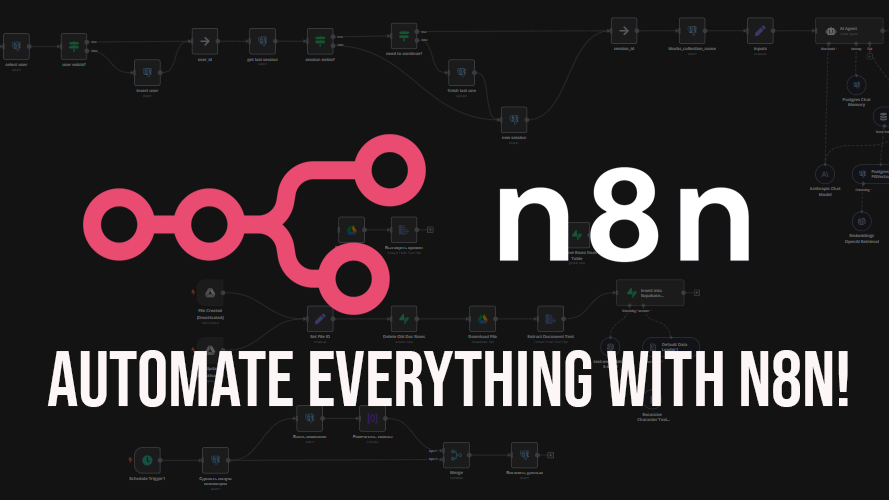
n8n is an open-source workflow automation tool developed and operated by n8n GmbH, based in Berlin, Germany. It was founded by engineer Jan Oberhauser, who currently leads the product as CEO. Since its first release on GitHub in June 2019 , n8n has rapidly gained popularity, especially in the open source community, and is now widely used by engineers and companies around the world.
n8n’s unique feature is its ability to connect APIs and external services as “nodes” and build workflows with intuitive visual operations. It offers both a free, self-hosted open-source version and a cloud version that reduces operational burden, allowing for flexible selection based on the use case. It also uses a unique licensing system called the “fair-code license,” which allows for free internal use but places certain restrictions on commercial and large-scale use.
Furthermore, n8n currently supports over 400 integrations, allowing it to work with a variety of systems, including Slack, Google services, and databases. In March 2025, the company raised 55 million euros, and development and feature expansion are expected to continue accelerating.
Due to its high flexibility and scalability, n8n is attracting attention as an “open source, highly flexible alternative to Zapier,” and can be said to be a tool that can greatly contribute to promoting digital transformation in companies and improving the productivity of development teams.
How n8n works
n8n is positioned as a “low-code/no-code automation tool” and is built around a visual workflow builder. Users can connect components called “nodes” to integrate with external applications
For example, it is possible to automatically forward emails received in Gmail to Slack, or automate new registrations by linking with a customer database. Another major feature is that it is open source and can be freely customized. Furthermore, integration with AI agents has recently progressed, making it possible to incorporate intelligent judgment into traditional automation flows.
Basic mechanism
The basic mechanism of n8n is to build workflows based on “nodes.” Nodes are components that handle specific processes or connect to external services, and users combine them to create automated workflows.
Workflows are made up of triggers, actions, and conditional branches, and can flexibly handle even complex business processes. For example, you can set up a series of processes without coding, such as registering input into a database when data is entered into a web form and then notifying the results by email.
| Component | Explanation |
| Trigger node | What triggers a workflow (e.g., receiving a new email) |
| Action nodes | Actual processing (e.g., Slack notification, DB saving) |
| IF node | Set conditional branching to separate processes |
| Function node | Flexible nodes that allow you to incorporate custom scripts |
In this way, while the basic mechanism is simple, it has the scalability to adapt to complex business operations.
Collaboration with AI agents
A major enhancement of n8n in recent years is its ability to work with AI agents. Conventional automation flows operate according to predefined rules, but by combining them with AI, flexible decisions can be made according to the situation. For example, you can create a system where n8n receives an inquiry email from a customer, and the AI analyzes its contents and decides whether to forward it to the support department or automatically return an FAQ.
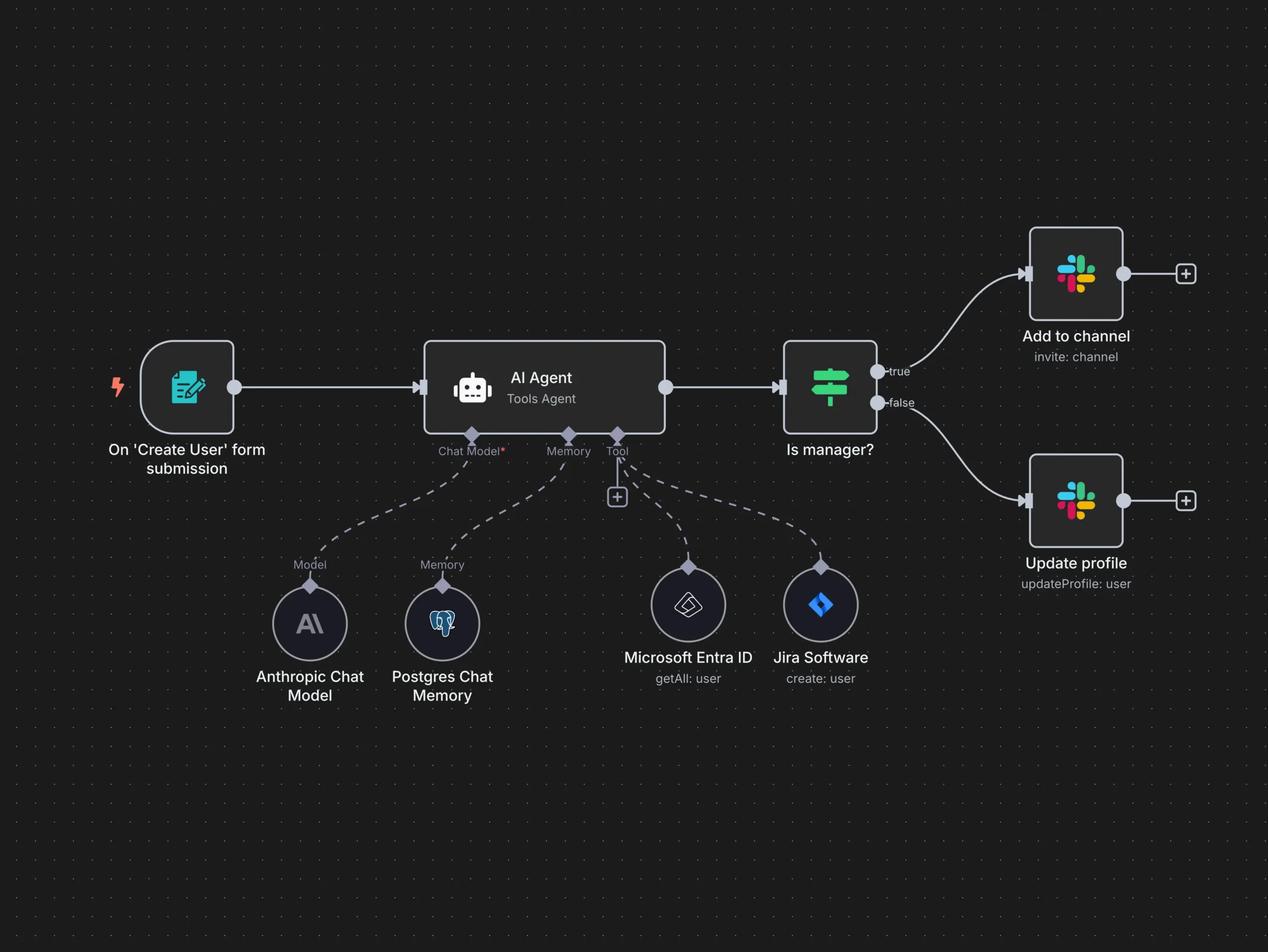
Furthermore, by incorporating generative AI, it is possible to perform advanced tasks such as drafting marketing materials and automatically generating customer support messages. As a result, n8n has evolved from a simple automation tool into an intelligent business support platform, and its adoption is accelerating as an important element in promoting digital transformation.
Main features of n8n
n8n is a platform with particularly high flexibility and scalability among many automation tools. This is because it is provided as open source and can combine over hundreds of types of nodes to build complex workflows. It also supports both cloud and self-hosting, making it suitable for a wide range of companies from the perspectives of security and cost.
Furthermore, integration with AI agents makes it possible to incorporate “intelligent processing” rather than simply automating tasks, achieving a high level of automation that is difficult to achieve with other competing tools. Below, we will explain the main features of n8n in detail.
Open source and freely customizable
One of n8n’s greatest strengths is that it is provided as open source, allowing users to freely view and modify the source code and customize it to suit their own company’s requirements.
For example, you can develop a dedicated node that connects to a specific internal system, or extend existing functions to build more complex workflows. This flexibility is not available with Zapier or Power Automate, which are closed services with large limitations.
Furthermore, since installing it on an in-house server ensures peace of mind in terms of security, it is increasingly being adopted by financial institutions and medical fields that handle highly confidential business. The high level of customizability is one of the reasons why n8n can be used not just as an automation tool but also as a development platform.
Abundant nodes and high scalability
n8n comes with hundreds of nodes, allowing for easy connection to external applications and services. Nodes are components that handle specific processes, such as Gmail, Slack, Google Sheets, databases, and APIs. By combining these, users can automate a series of processes, including data acquisition, transformation, notification, and storage.
Furthermore, by using “Function nodes” that incorporate conditional branching, loop processing, and custom code, more advanced and complex workflows can be built. Developers can add and extend their own nodes to realize automation specific to their business. This high scalability makes n8n a powerful tool that can handle a wide range of tasks, from simple task processing to large-scale system integration.
Self-hosted and cloud-enabled
n8n offers both cloud and self-hosted versions, allowing for flexible selection depending on your usage scenario. The advantage of the cloud version is that it allows you to use the officially hosted environment, so you can start using it immediately without the hassle of installation. On the other hand, the self-hosted version can be installed and operated on your own server or cloud infrastructure, making it suitable for industries with strict data handling requirements or companies with high security requirements.
When handling customer information or confidential data, the fact that the data does not need to be exposed to third parties is a great source of peace of mind. Furthermore, the self-hosted version allows for in-house expansion and customization, enabling operations to be optimized for business needs. This makes n8n a platform that can meet a wide range of needs, from small personal use to large corporations.
Integration with AI agents
In recent years, n8n has also focused on integrating with generative AI and AI agents, making it possible to add intelligence to traditional rule-based automation. For example, when an inquiry email is received from a customer, the AI can analyze the content and automatically generate an appropriate answer from FAQs to reply.
In the field of marketing, n8n can generate optimal messages based on customer data analyzed by AI and automatically deliver them to provide a more effective customer experience. Furthermore, by connecting it to natural language processing models such as the GPT series, it is possible to automate intellectual tasks such as summarizing and translating text and creating reports.
By integrating with AI, n8n goes beyond simple task automation and evolves into a next-generation automation platform that supports strategic decision-making and improved customer experiences.
More flexibility than competing tools such as Zapier
n8n has a great advantage over competing tools such as Zapier and Power Automate in terms of its high degree of freedom. While Zapier is easy to get started with, complex conditional branching and usage limits can be a bottleneck.
On the other hand, n8n allows for nearly unlimited execution times and the construction of advanced logic, enabling more complex workflows. Furthermore, because it is open source, it is also attractive in that it allows for the addition of in-house functions and API integration. This allows for flexible adoption by individual users as well as companies with industry-specific needs.
In terms of cost, while Zapier charges increase depending on the number of uses, n8n allows for self-hosted operation, allowing for large-scale operation at low cost. This high degree of freedom is a great asset for companies promoting digital transformation.
How to use n8n
While n8n is an open-source automation tool, its usage is broadly divided into cloud and self-hosted versions. The cloud version allows you to access an officially provided environment and get started right away, making it suitable for beginners and small-scale use.
On the other hand, the self-hosted version can be installed and used on your own server or cloud service ( AWS , GCP , Azure , etc.), making it suitable for companies with strict data handling standards or those considering large-scale operations.
Both methods have an intuitive design that allows you to combine nodes, and their main appeal is that they can be used without any coding knowledge. Below, we will explain in detail how to use each method.
Cloud version
You can easily start using the cloud version of n8n by visiting the official website and creating an account.
It does not require installation in a local environment, and you can immediately start creating and executing workflows from a web browser, making it easy to get started. Pricing is on a subscription basis, with plans available based on the scale of use.
For example, it can be used for a wide range of purposes, from automating tasks for individuals or small teams to improving work efficiency for medium-sized companies. In a cloud environment, the latest version is always applied, and security patches and maintenance are also performed automatically, minimizing the effort required for management.
Self-hosted
The self-hosted version of n8n is installed on your own server or cloud service using Docker or Node.js.
Compared to the cloud version, it requires knowledge of initial setup and server management, but it excels in terms of security and customizability. For example, because customer information and confidential data can be managed within the company without being disclosed, it can be safely implemented in industries with strict information management, such as finance and medical institutions.
Next, open a command prompt and run the following command:
“npx n8n”
At this time, you may be asked to update and an error may occur, so please run the command below and then run the above again.
“npm install -g npm@10.2.4”
You will then be asked “Ok to proceed? (y)”, so enter “y” and press Enter. A bunch of text will appear on the command prompt, and if the following statement is output on the last line, it means the command was successful.
n8n pricing structure
n8n offers different pricing structures for its cloud and self-hosted versions. The cloud version is a subscription-based system where charges are based on the number of users and workflows. On the other hand, with the self-hosted version, the software itself is free to use, but additional costs for infrastructure and maintenance are required.
This flexible pricing structure allows us to cater to a wide range of needs, from small-scale personal use to large-scale corporate use.
| Plan | Monthly fee | Number of users | Number of executions | Key Features |
| Free (Cloud) | free | 1 user | Limited | For testing and learning.
Basic functions available for trial. |
| Basic (Cloud) | From about $20 | Multiple Users | Medium-scale restrictions | Suitable for small teams
Allows stable operation |
| Pro (Cloud) | From about $50 | Team Support | Limit extension | For business use.
Support included. |
| Enterprise (Cloud) | Please inquire | Large-scale | Nearly unlimited | Guaranteed SLA, dedicated servers, extended support |
| Self-hosted | Free (OSS) | Unlimited | Unlimited | Software is free to use.
Infrastructure and operational costs are separate. |
n8n’s pricing structure is designed flexibly to meet user needs. The cloud version starts with a free plan, providing an easy environment for individual developers and users looking to learn. Moving up to a paid plan allows for team use, increases the number of executions, and strengthens the support system, providing greater peace of mind for business use.
The Pro and higher plans are suitable for small and medium-sized businesses that prioritize stability and security, while the Enterprise plan is recommended for larger businesses that require dedicated servers and SLAs (service level agreements).
On the other hand, the self-hosted version is completely free to use, but requires you to build and maintain your own servers and infrastructure. However, it offers greater flexibility and cost control, making it popular with industries that require strict information management and companies considering large-scale operations.
As such, n8n offers pricing structures tailored to a diverse range of users, allowing you to choose the most suitable option depending on your scale and purpose.
How n8n compares to other automation tools (Zapier, Dify, Power Automate)
| tool | Pricing | Freedom and expandability | Number of supported apps | Key Features |
| n8n | OSS is free, but cloud services have paid plans | Very expensive (additional code possible) | hundreds or more | Open source, customizable, and self-hosted |
| Zapier | Monthly fee (charged per use) | Moderate (limited branching) | Over 5,000 | The number of compatible apps is the largest in the industry. Easy to install and suitable for beginners |
| Dify | Free basic plan + paid plan | High (AI specialized) | Mainly AI-related | Strengths in utilizing AI agents and generative AI |
| Power Automate | Microsoft 365 integration, pay-as-you-go pricing available | Expensive (but closer to the Microsoft environment) | Over 300 | Strong integration with Microsoft products. Suitable for enterprise use. |
Compared to Zapier and Power Automate, n8n’s biggest advantage is that it is provided as open source. Zapier supports a large number of apps and is easy to use even for beginners, but it has limitations on branching and building advanced logic, and tends to be expensive for large-scale use.
Power Automate has excellent integration with Microsoft 365 and is suitable for companies that use Office products extensively, but it has less flexibility if your environment is not Microsoft-centric.Dify, on the other hand, specializes in utilizing AI, and its strength is that it can easily incorporate generative AI and AI agents into business processes.
In contrast, n8n offers the flexibility of choosing between a cloud version and a self-hosted version, as well as the ability to add custom nodes and embed code, and can seamlessly integrate with AI tools. In other words, although n8n is inferior to Zapier in terms of the number of supported apps, it is far superior in terms of freedom and scalability, making it an ideal choice for companies and developers with many unique requirements.
n8n usage examples
n8n leverages the strengths of open source and is flexible enough to meet a wide range of automation needs regardless of industry or business. It is being used in a variety of situations, such as automating daily reports and customer management in sales, streamlining everything from orders to inventory management in e-commerce operations, and optimizing development flows and notifications in engineering teams.
Furthermore, it supports integration with the latest AI services such as OpenAI and external SaaS, and is characterized by its development into “intelligent automation” rather than simply labor-saving. Here, we will introduce five specific use cases and clearly explain how it can be useful in business settings and development environments.
Slack notifications × Google Sheets records (sales and reporting)
For sales teams and customer support departments, it is important to share customer support details and sales progress in real time. With n8n, you can create a workflow that automatically transfers information posted on Slack to Google Sheets.
This allows the person in charge to simply report on Slack, and the data is accumulated in a spreadsheet, facilitating later analysis and progress checks. This prevents manual double entry and omissions, improving the work efficiency of the entire team.
Furthermore, by adding a system that automatically generates aggregate reports based on the data on the sheet and sends them to Slack, reporting to management can also be automated in a seamless manner. This is a practical example of how you can achieve both visualization and efficiency in sales activities.
Shopify × Notion integration (EC site operation)
Order management and inventory status are essential for running an e-commerce website. By using n8n, you can create a system that automatically registers new orders placed on Shopify into Notion’s database.
This allows for centralized management of order details and customer information, enabling the entire operations team to understand the situation in real time. Furthermore, by syncing inventory levels with Notion, the data needed for product pages and customer support can always be shared and up-to-date. By integrating order data and customer information that were previously managed in separate tools, operational efficiency is not only greatly improved, but human error is also reduced. Automation with n8n is a valuable system for a wide range of businesses, from small businesses to large-scale e-commerce sites.
Webhook × OpenAI (AI collaboration)
n8n uses Webhooks to receive requests from external services and pass that data to OpenAI’s API, enabling advanced integration with generative AI.
For example, you can create a system that receives inquiries entered into a form by a user via Webhook and sends them to OpenAI to automatically generate responses and reply via email or Slack. Furthermore, incorporating processes such as summarizing product reviews and translating text directly leads to more efficient marketing and customer support. Compared to traditional rule-based automation, incorporating AI has the greatest appeal in automating intelligent processes such as judgment and creativity.
The combination of n8n’s flexible workflow building capabilities and OpenAI’s natural language processing capabilities is attracting attention as a next-generation automation platform.
GitHub integration × CI notification (for engineers)
In software development, it is necessary to quickly share repository updates and the execution status of CI/CD pipelines with the entire team. With n8n, you can easily build a workflow that detects pull requests and commits on GitHub as triggers and automatically notifies the results on Slack or Teams.
Furthermore, n8n can import the results of CI tools (such as Jenkins or CircleCI) and enable advanced conditional branching, such as sending an alert to the team only in the event of a failure. This saves engineers the trouble of manually checking progress, creating an environment where they can respond immediately when a problem occurs. n8n is a powerful support tool for development teams, as it can simultaneously speed up the entire development cycle and improve quality.
Auto-sync with external APIs (SaaS integration)
Modern businesses often use multiple SaaS services in parallel, making it important to have a system that efficiently synchronizes the data between them. n8n excels at integrating with external APIs, allowing you to automatically synchronize data from CRM, accounting software, marketing tools, and more.
For example, it is possible to link multiple SaaS together, such as updating customer purchase information on an e-commerce site in CRM and simultaneously sending that customer data to an email marketing tool. This not only reduces the effort required for manual data transcription and updating, but also improves the accuracy of the entire business by maintaining consistency of information.
In addition, n8n can be integrated with services that have their own APIs, allowing it to flexibly accommodate a company’s unique workflow. n8n functions as a powerful hub that unifies SaaS environments that tend to be fragmented.
summary
n8n is a next-generation automation tool that offers the flexibility and scalability that only open source can provide. It offers the flexibility to choose between cloud and self-hosted versions, and can also integrate with AI agents and external SaaS , making it suitable for a wide range of applications, from improving business efficiency to promoting advanced digital transformation.
Compared to competing services such as Zapier, n8n offers greater flexibility, allowing you to build optimal workflows tailored to your business requirements. At HBLAB, we leverage our extensive knowledge of AI development and business automation to propose optimal solutions, including n8n, and provide implementation support.
If you’re considering using automation that suits your company, please feel free to contact us at HBLAB.
Read more:
– Transform Your Business with Low Code No Code Platforms
– Free AI Cover Letter Generator: The Complete Guide for Job Seekers (With Zero Cost Tools)
– AI Podcast Generator: The Complete 2026 Guide to Creating High-Quality AI-Generated Podcasts